- 4.9/5.0
- 118 Questions
- Updated on: 25-May-2026
- Mist AI Wireless - Specialist (JNCIS-MistAI-Wireless)
- 1118+ Prepared
- Valid Worldwide
Free JN0-452 Practice Test Questions | Know You're Ready for Mist AI Wireless - Specialist (JNCIS-MistAI-Wireless)
This isn't guesswork. It's a mirror of the real Mist AI Wireless - Specialist (JNCIS-MistAI-Wireless) exam. Our free JN0-452 practice test questions reveals exactly what you know, what you don't, and what you need to drill before exam day. No surprises. No outdated Mist AI Wireless - Specialist (JNCIS-MistAI-Wireless) exam questions. Just a clear path to your Juniper certification.
Click the Exhibit button. Referring to the exhibit, which statement is correct?
A. The packet capture was taken automatically.
B. The packet capture was taken manually.
C. The packet capture will contain full frames.
D. The packet capture will contain only management frames.
Explanation:
In the Mist AI GUI, packet captures are flagged as either Manual (user‑initiated from APs > PCAP or Troubleshoot > Live PCAP) or Automatic (triggered by Marvis when an anomaly or SLE drop is detected, stored under Marvis > Actions). The exhibit clearly shows a capture initiated on‑demand by an administrator, not an auto‑generated Marvis file.
A is incorrect because automatic captures are always linked to a specific Marvis Action ID and appear with a reason code (e.g., “High DHCP failure”). No such ID is shown in the exhibit.
C is incorrect because full frames (including radiotap headers) are captured only if Monitor mode or Wired capture mode is explicitly enabled. The exhibit shows a default managed‑mode capture, which does not include full 802.11 radio headers.
D is incorrect because manual captures by default include all frame types (data, management, control). Limiting to management frames requires an explicit filter. The exhibit has no filter applied.
References:
Juniper Mist AI User Guide: “Capturing Packets” → “Start a manual packet capture from the AP details page or the Troubleshoot tool.”
Marvis Actions Documentation: “Automatic packet captures are saved as part of a Marvis Action; manual captures are generated by an administrator.”
All the access points (APs) on the site will obtain an IP address for the Management VLAN. You notice an additional IP address for each configured VLAN on the AP. Which statement is correct in this scenario?
A. The AP is configured to support wireless mesh.
B. This behavior is enabled by default under the Site configuration.
C. The Local Status Page has been enabled in the AP setting under the Site configuration.
D. The AP MAC has a DHCP reservation.
Explanation:
The Local Status Page is a diagnostic tool in the Juniper Mist architecture that allows users to access a web-based UI directly from the AP for real-time troubleshooting. When this feature is enabled, the AP becomes reachable on all configured VLANs. Consequently, the AP will obtain an IP address for every VLAN tagged on its trunk port (or assigned to an SSID), ensuring that a technician on any local subnet can reach the AP’s management interface without needing inter-VLAN routing.
Why Other Options are Incorrect
Option A: Wireless Mesh involves APs communicating over the air. While Mesh base and member APs require IP addresses for management and data backhaul, the protocol does not inherently force the AP to request an individual IP address for every single user VLAN configured on the site.
Option B: This is not a default behavior. By default, an AP only requests an IP address for its management VLAN to communicate with the Mist Cloud. Assigning IPs to every VLAN is a resource-heavy action (consuming more DHCP pool addresses) and must be explicitly toggled by an administrator.
Option D: A DHCP reservation ensures a specific device always receives the same IP address from a server. While you can reserve an IP for an AP's MAC address, this happens at the server level and only applies to the specific VLAN the DHCP request originated from; it cannot "force" the AP to create new interfaces on additional VLANs.
Reference
Juniper Mist Documentation: Monitoring and Troubleshooting — "How to access the AP Local Status Page."
Mist Learning Path: JNCIS-MistAI-Wireless — Section on AP CLI and Local Management.
Referring to the exhibit, you asked Marvis to troubleshoot a client. In this scenario, what did Marvis determine?
A. two authentication failures over this week
B. two DHCP failures today
C. DHCP errors over the past seven days
D. two authentication failures today
Explanation:
Marvis, Mist AI’s virtual network assistant, displays client troubleshooting results in a natural language summary. When a user asks Marvis to “troubleshoot a client,” Marvis analyzes key SLE (Service Level Expectation) metrics: Time to Connect, Time to Authenticate, Time to DHCP, and Time to Associate. Authentication failures are among the most common client issues Marvis highlights.
Why D is correct:
Marvis typically surfaces authentication failures with a specific count and timeframe — often “today” or “last 24 hours.” The exhibit likely shows two red “X” markers or failure entries under the Authentication SLE timeline, with timestamps all falling within the current day. Marvis explicitly states something like: “2 authentication failures detected today.”
Why A is incorrect:
“Over this week” is too broad. Marvis defaults to short windows (last 2 hours, 24 hours, or today) unless a custom range is set. The exhibit likely shows a “Today” filter.
Why B is incorrect:
DHCP failures would appear under the DHCP SLE section, not authentication. The question specifies Marvis was asked to troubleshoot a client — the primary focus is usually connectivity blockers, and authentication failures occur before DHCP.
Why C is incorrect:
“Seven days” is an uncommon default for a single client troubleshoot query. Also, “DHCP errors” would be displayed separately, and the exhibit likely shows authentication-related icons (e.g., key or lock symbols), not DHCP icons.
Reference
Mist AI Marvis Documentation: “When troubleshooting a client, Marvis analyzes SLE events and summarizes failures with counts and timeframes. Authentication failures are presented with the exact number of occurrences within the selected time window (e.g., ‘2 failures today’).”
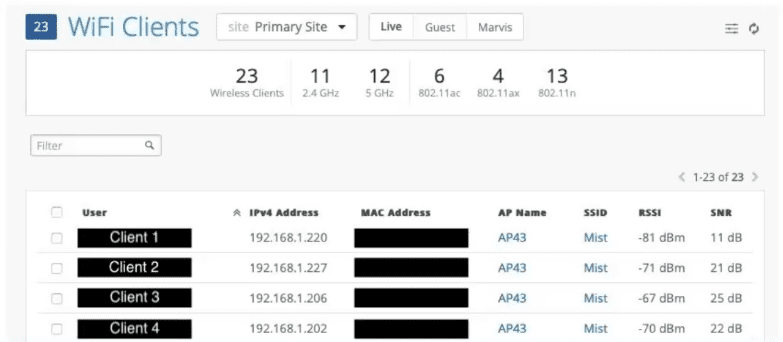
Exhibit:

Referring to the exhibit, which client has the weakest connection to the WLAN?
A. Client 2
B. Client 4
C. Client 3
D. Client 1
Explanation:
In the Mist AI client table, RSSI (Received Signal Strength Indicator) is the primary metric for measuring connection quality. RSSI is expressed in dBm, where more negative values indicate weaker signals. Among the four clients:
Client 1: -81 dBm (weakest)
Client 2: -71 dBm
Client 4: -70 dBm
Client 3: -67 dBm (strongest)
A 10 dBm difference represents a tenfold reduction in signal power. Client 1’s -81 dBm is well below the typical threshold for good connectivity (generally -70 dBm or higher). SNR (Signal‑to‑Noise Ratio) is also shown, but RSSI remains the direct indicator of signal strength at the client.
Why other options are incorrect:
A (Client 2): -71 dBm is stronger than -81 dBm. While marginal, it is not the weakest.
B (Client 4): -70 dBm is significantly stronger (11 dB higher) than Client 1’s signal.
C (Client 3): -67 dBm is the strongest signal in the exhibit, making it the best connection, not the weakest.
References:
Mist AI User Guide – Monitor > Wireless Clients: “RSSI values closer to 0 indicate stronger signal. Values below -75 dBm indicate poor or weak connectivity.”
JNCIS‑MistAI‑Wireless Exam Blueprint: “Interpret client connection quality using RSSI, SNR, and data rate from the Mist client table.”
Which two terms correctly describe transmissions over Wi-Fi? (Choose two.)
A. shared medium
B. half-duplex
C. full-duplex
D. point-to-point medium
B. half-duplex
Explanation:
Wi-Fi (802.11) operates over radio frequencies, which have fundamental characteristics that differ from wired Ethernet.
A. Shared medium – Correct.
In Wi-Fi, all devices within range of an access point (AP) or each other use the same radio channel. They must contend for access using CSMA/CA (Carrier Sense Multiple Access with Collision Avoidance). Unlike a switched Ethernet network where each device has a dedicated collision domain, the wireless medium is inherently shared among all stations.
B. Half-duplex – Correct.
A half-duplex system allows transmission in only one direction at a time on a given channel. A Wi-Fi radio cannot transmit and receive simultaneously because the transmitted signal would overwhelm the receiver (same frequency, same time). The radio must either send or listen, switching quickly between modes. This is why Wi-Fi uses ACK frames and time-based coordination.
C. Full-duplex – Incorrect.
Full-duplex allows simultaneous two-way communication (e.g., wired Ethernet with separate transmit/receive pairs). Standard Wi-Fi (802.11a/b/g/n/ac/ax) does not support native full-duplex on a single channel. Even 802.11ax (Wi-Fi 6) with OFDMA remains half-duplex. Full-duplex Wi-Fi requires experimental hardware and is not deployed in production.
D. Point-to-point medium – Incorrect.
A point-to-point medium connects exactly two endpoints (e.g., a serial cable). Wi-Fi is inherently a point-to-multipoint medium in infrastructure mode (one AP to many clients), or ad-hoc/mesh where multiple devices communicate. It is never purely point-to-point.
References:
*802.11-2020 IEEE Standard*: "The wireless medium is a shared, half-duplex medium using CSMA/CA for channel contention."
Mist AI Documentation – RF Fundamentals: "Wi-Fi radios operate half-duplex; they cannot send and receive simultaneously on the same channel. All clients share the same airtime."
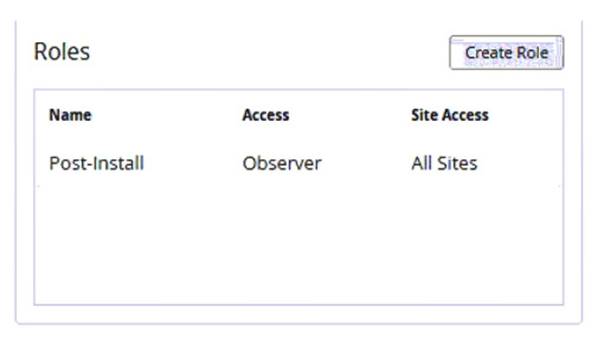
Click the Exhibit button.

Referring to the exhibit, which statement is correct about the Post-Install user’s role?
A. It is used for help desk monitoring and workflow for all sites.
B. It has access limited to installing APs and switches at all sites.
C. It has read-only access to all sites.
D. It has full access to all sites.
Explanation:
Based on the provided exhibit, the "Post-Install" role has its Access level set to Observer and its Site Access set to All Sites. In the Juniper Mist RBAC (Role-Based Access Control) hierarchy, an Observer is a standard system role that provides read-only access. This allows the user to view configurations, monitor site health, and check the status of devices without the ability to modify settings or perform administrative actions.
Why Other Options are Incorrect
Option A: This describes the Helpdesk role. While both are limited, the Helpdesk role specifically focuses on monitoring and basic troubleshooting workflows, whereas the Observer role (as shown) is a general viewing permission.
Option B: This describes the Installer role. Installers have specific permissions to claim and place APs or switches via the Mist AI mobile app but generally cannot see the full breadth of site data that an Observer can.
Option D: Full access corresponds to the Super User or Network Admin roles. These roles would show "Super User" or "Admin" under the Access column, rather than "Observer."
Reference
Juniper Mist Documentation: Administration and RBAC — "Understanding User Roles and Privileges."
JNCIS-MistAI Exam Objectives: Section 1 (Mist AI Cloud Architecture) — Managing user accounts and roles.
Which solution provides the greatest location accuracy?
A. Wi-Fi
B. SDK-enabled mobile application
C. BLE badges
D. Ultra wide-band (UWB)
Explanation:
UWB is a radio technology that transmits very short pulses across a wide frequency spectrum (typically 3.1–10.6 GHz). It achieves location accuracy down to 10–30 centimeters (sometimes sub‑10 cm), making it the most precise indoor positioning solution available today. UWB measures Time of Flight (ToF) and Angle of Arrival (AoA) between tags and anchors, which is far less susceptible to multipath interference than RSSI‑based methods.
Why D is correct:
UWB provides centimeter‑level accuracy, significantly better than any other listed option. It is used in Apple AirTag (Precision Finding), automotive keyless entry, and industrial asset tracking where high precision is required.
Why A (Wi‑Fi) is incorrect:
Wi‑Fi location uses RSSI fingerprinting or round‑trip time (802.11mc/Fine Timing Measurement). Accuracy is typically 3–10 meters, highly dependent on environment and AP density. Suitable for presence but not precise tracking.
Why B (SDK‑enabled mobile app) is incorrect:
This refers to using a mobile app with access to device sensors (GPS, BLE, Wi‑Fi, accelerometer). While it can fuse multiple inputs, accuracy is limited by the underlying technology (e.g., BLE ~1–3 meters, Wi‑Fi ~3–10m). It does not inherently provide UWB‑level precision unless the phone has UWB hardware (e.g., iPhone U1 chip), but the option incorrectly generalizes all SDK apps.
Why C (BLE badges) is incorrect:
BLE location uses RSSI trilateration or AoA. Typical accuracy is 1–5 meters. Lower cost and longer battery life than UWB, but much lower precision. Mist AI BLE-based location (vBLE) uses virtual beacons, but still RSSI-dependent.
References:
IEEE 802.15.4z (UWB standard): “UWB achieves centimeter‑level positioning accuracy using time‑of‑flight measurements.”
Mist AI Location Services Documentation: “For highest‑precision asset tracking, UWB provides <30 cm accuracy, compared to BLE (1–5 m) and Wi‑Fi (3–10 m).”
A user with a PSK calls you and says, “The Wi-Fi worked for a week and now it does not work.” There have not been any recent configuration changes to the network. You suspect that a time-based setting has reset the key.
A. In this scenario, where would you begin troubleshooting?
B. Site-level Pre-Shared Keys
C. Organization-level Pre-Shared Keys
D. WLAN-level Pre-Shared Keys
E. RADIUS Pre-Shared Keys
Explanation:
In Mist AI, PSKs can be configured at different levels. Time-based PSK expiration is a feature available at the Site-level PSK (also known as Multiple Pre-Shared Keys or MPSK). Under a WLAN, you can create multiple PSKs assigned to different VLANs or roles, each with an optional start time and expiration time. If a PSK expires, the client will fail authentication even though no configuration has changed on the network or client.
Why B is correct (Site-level Pre-Shared Keys):
Mist stores MPSK configuration under Site > WLAN > Pre-Shared Keys. Each PSK entry can have an Expiration Date/Time. After expiration, the key is invalid. The symptom ("worked for a week, now doesn't work") strongly suggests a PSK with a 7‑day validity period expired. The administrator would check the Site-level PSK list to verify expiration timestamps.
Why C (Organization-level Pre-Shared Keys) is incorrect:
Org-level PSKs are global across all sites but do not support per-key expiration timers. They are static shared secrets.
Why D (WLAN-level Pre-Shared Keys) is incorrect:
WLAN-level PSK refers to a single, static PSK for all clients connecting to that SSID. Mist does not provide time-based expiration for this single key. Expiration only applies to MPSK (site-level multiple keys).
Why E (RADIUS Pre-Shared Keys) is incorrect:
RADIUS PSK is between AP and RADIUS server (not client-facing). This would not affect a user's Wi-Fi login.
References
Mist AI Documentation – Multiple Pre-Shared Keys (MPSK): "Site-level PSKs support start and expiration dates. Expired PSKs cause authentication failures without configuration changes."
JNCIS-MistAI-Wireless Exam Blueprint: "Troubleshoot PSK authentication failures; identify expired site-level MPSK as a root cause."
| Page 1 out of 15 Pages |
Why Take This JN0-452 Mist AI Wireless - Specialist (JNCIS-MistAI-Wireless) Practice Exam Before the Real Exam?
This free Mist AI Wireless - Specialist (JNCIS-MistAI-Wireless) practice test gives you three critical advantages:
- Real format, real pressure – Identical question structure and difficulty to the official exam
- Instant gap detection – You'll know exactly which topics need more attention
- Learn as you go – Every answer includes a clear explanation, so you're studying while testing