• 4.9/5.0
  • 118 Questions
  • Updated on: 12-Jun-2026
  • Mist AI Wireless - Specialist (JNCIS-MistAI-Wireless)
  • 1118+ Prepared
  • Valid Worldwide

Free JN0-452 Practice Test Questions | Know You're Ready for Mist AI Wireless - Specialist (JNCIS-MistAI-Wireless)


A client calls you to troubleshoot possible interference with your wireless network. Before you drive to the customer’s site to investigate, you want to quickly verify if there is actually any interference at all. In this scenario, which SLE is responsible for this interference?

A. coverage

B. roaming

C. throughput

D. capacity

D.   capacity

Explanation:

In Juniper Mist AI, Service Level Expectations (SLEs) are metrics that measure different aspects of wireless network performance from the client experience perspective . The Capacity SLE is specifically designed to track issues related to available bandwidth and airtime utilization, which includes both Wi-Fi and non-Wi-Fi interference as key contributing factors .

Why other options are incorrect:

A. Coverage: The Coverage SLE tracks signal strength issues, specifically monitoring when client RSSI falls below acceptable thresholds (weak signal) or when there is signal asymmetry between downlink and uplink . Coverage relates to distance from AP or physical obstructions, not interference sources.

B. Roaming:
The Roaming SLE tracks client transitions between access points, measuring issues such as slow roaming (exceeding 400ms), failed fast roaming attempts, or problems with 802.11r/OKC . This is unrelated to detecting interference.

C. Throughput:
The Throughput SLE measures when client data rates fall below defined thresholds. While interference can indirectly impact throughput, the Throughput SLE identifies the root cause through classifiers like Device Capability, Coverage, Network Issues, and Capacity . The Capacity classifier within Throughput points to capacity/interference issues, but the primary SLE for interference detection is Capacity itself .

References:

Mist AI Documentation - Service Level Expectations: "Capacity SLE tracks client count, client usage, Wi-Fi interference, and non-Wi-Fi interference"

Juniper Radio Management Guide: "If the capacity SLE is taking a hit based on Wi-Fi or non-Wi-Fi interference, then your end-user experience is taking a hit"

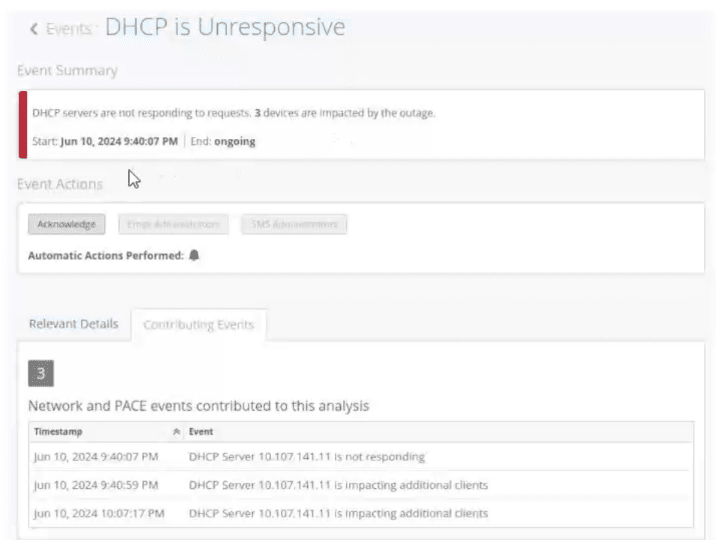
Refer to Exhibit:

You notice that your site events show an unresponsive DHCP server in your network. You want to analyze the event by using the dynamic packet capture. Referring to the exhibit, how would you access the packet capture for further analysis in Wireshark?

A. Verify the impacted site and use the corresponding organization event to fetch the automatically generated packet capture.

B. Verify the impacted site and use the corresponding site event to fetch the automatically generated packet capture.

C. Verify the impacted client and use the corresponding site event to fetch the automatically generated packet capture.

D. Verify the impacted client and use the corresponding client event to fetch the automatically generated packet capture.

B.   Verify the impacted site and use the corresponding site event to fetch the automatically generated packet capture.

Explanation:

In Mist AI, when Marvis detects a condition like "DHCP is Unresponsive," it automatically generates a packet capture from the AP(s) involved in the failure. This capture is stored as part of the site‑level event — NOT as an organization event, client event, or manual capture. The exhibit shows a site event (indicated by the "Events: DHCP is Unresponsive" title and the site‑specific impact summary: "3 devices are impacted").

Why B is correct:
To retrieve the automatic PCAP for this DHCP failure, you would go to Site → Marvis → Events, locate this "DHCP is Unresponsive" event, and click the download icon or PCAP link associated with it. The capture is tied to the site event because the condition (DHCP server unresponsive) affects multiple clients at that site.

Why A is incorrect:
Organization events are higher‑level (e.g., license expiry, org configuration changes). Automatic troubleshooting captures are not stored at the organization level; they are per‑site.

Why C is incorrect:
While a specific client may be impacted, the automatic capture is not fetched from a client event page. Client‑level pages show SLE timelines and client‑specific Marvis summaries, but the PCAP is attached to the broader site event that triggered the detection.

Why D is incorrect:
Client events (e.g., "Client authentication failure") may generate automatic captures as well, but the exhibit clearly shows a site‑wide DHCP server issue affecting multiple clients. The event is categorized as a site event, not a client event.

References

Mist AI Documentation – Marvis Actions: "When Marvis detects a network condition such as DHCP unresponsiveness, an automatic packet capture is generated and attached to the corresponding site event."

JNCIS‑MistAI‑Wireless Exam Blueprint: "Locate and download automatic packet captures from Marvis site events for troubleshooting."

Click the Exhibit button.
Referring to the exhibit, which statement is true?

A. The WLAN is configured to use DFS channels.

B. The WLAN is configured to only broadcast on the 2.4 GHz spectrum.

C. The WLAN is configured with the high-density data rate setting enabled.

D. The WLAN is configured to use geofencing.

C.   The WLAN is configured with the high-density data rate setting enabled.

Explanation:

In the Mist dashboard, the Data Rates setting determines which basic and supported rates an Access Point will advertise for a specific WLAN. When a WLAN is configured with the High Density (or "High-Density Data Rate") setting, lower data rates (typically those below 12 Mbps or 24 Mbps, such as 1 Mbps, 2 Mbps, 5.5 Mbps, and 11 Mbps) are disabled.

This forces clients to use higher modulation schemes and reduces management overhead, as beacons and probe responses are transmitted at higher speeds. This effectively shrinks the "effective" cell size, preventing distant clients with poor signals from clinging to the AP and slowing down the overall airtime for other users.

Why Other Options are Incorrect

Option A: DFS (Dynamic Frequency Selection) is a channel management setting found under Radio Management (RRM) in the Site or AP settings, not typically within the primary WLAN configuration view shown in such exhibits.

Option B: The exhibit would need to explicitly show a radio band selection limited to 2.4 GHz only. Most modern Mist WLANs are dual-band by default unless specifically toggled to a single spectrum.

Option D:Geofencing is a location-based feature used to restrict WLAN access based on a client's physical coordinates (latitude/longitude) or proximity to specific APs. While Mist supports this, it is a distinct security/policy configuration and is not what is being represented by the data rate sliders or presets.

Reference

Juniper Mist Documentation: WLAN Data Rates — "Optimizing for High Density Environments."

JNCIS-MistAI Exam Objectives: Section 3 (WLAN Configurations) — Radio resource management and data rate settings.

According to the Coverage SLE, which classifier tracks a client that transmits at a lower data rate than the AP to which it is connected?

A. Asymmetry Downlink

B. Wi-Fi Interference

C. Asymmetry Uplink

D. Slow OKC Roam

A.   Asymmetry Downlink

Explanation:

The Asymmetry Downlink classifier specifically tracks scenarios where a client transmits at a lower data rate than the AP to which it is connected. This situation creates an "asymmetric" connection where the uplink (client to AP) is slower than the downlink (AP to client). In wireless networks, this typically occurs when the client device has lower transmit power or poorer radio capabilities compared to the AP .

Here is how the Coverage SLE classifiers break down:

A. Asymmetry Downlink (Correct):
Tracks a client that transmits at a lower data rate (weaker signal) than the AP. This is detected when the client's signal is weak (below -75dBm) and its transmit power is significantly lower than the AP's, indicating an uplink limitation .

B. Wi-Fi Interference (Incorrect):
This classifier belongs to the Capacity SLE, not the Coverage SLE. It tracks performance degradation caused by co-channel or adjacent channel interference from other wireless networks .

C. Asymmetry Uplink (Incorrect):
This is the opposite scenario—when the AP transmits at a lower rate than the client. It points to a potential AP transmit power issue rather than a client limitation .

D. Slow OKC Roam (Incorrect):
This classifier is part of the Roaming SLE, not the Coverage SLE. It tracks issues related to clients failing to roam quickly using Opportunistic Key Caching .

References:

Mist SLE API Documentation:
Lists "Asymmetry Downlink" as a classifier for the Coverage metric, used to identify uplink rate limitations .

Mist Coverage Problems Documentation: Explains that Asymmetry classifiers track "user minutes that a client experiences bad coverage... attributed to asymmetric transmit powers between the AP and client device" .

Which access points (APs) will be considered for inclusion in the AP Offline Marvis Action?

A. all APs assigned to sites that have connected to the cloud previously

B. all APs assigned to sites

C. all APs in inventory

D. all purchased APs

A.   all APs assigned to sites that have connected to the cloud previously

Explanation:

The "AP Offline" Marvis Action detects access points that are offline due to lack of power, loss of cloud connectivity, or other issues . According to official Juniper documentation, Marvis can determine the scope of offline AP actions by evaluating the connection history and prior connectivity status of APs .

Marvis monitors APs by tracking their cloud connectivity status. For an AP to be considered for the Offline action, the system must have previously observed it connected to the cloud. This historical baseline is necessary because Marvis cannot determine that an AP is "offline" if it has never been online in the first place. A new AP that has just been added to inventory but never assigned to a site or connected to the cloud would not trigger this alert—it is simply "unclaimed" or "not yet deployed" rather than "offline" .

The AP Offline alert is specifically triggered when a previously connected AP loses cloud connectivity or power. The scope analysis can identify various scenarios: an entire site down with all APs losing cloud connectivity, a switch failure causing downstream APs to go offline, or individual APs that are locally reachable but disconnected from the cloud .

Why other options are incorrect:

B. all APs assigned to sites – An AP can be assigned to a site but never powered on or connected to the cloud. Marvis cannot consider such APs "offline" because they were never online. The alert requires a prior connection state to establish a baseline.

C. all APs in inventory
– The inventory includes APs that are claimed but may still be in boxes, never deployed, or not yet assigned to any site. These APs have no connectivity history, so Marvis cannot generate an Offline action for them .

D. all purchased APs
– Purchased APs might not even be claimed in the inventory system yet. Without being claimed and having established prior cloud connectivity, they are outside the scope of Marvis monitoring for offline detection.

References:

Juniper Marvis Actions Documentation: "Marvis detects APs that are offline due to lack of power, loss of cloud connectivity, or any other issue"

Juniper AP Actions Guide: "Marvis can determine the scope of offline AP actions" including cases where APs were previously connected

Which Wireless Assurance SLE has classifiers of Association, Authorization, DHCP, and Internet Services?

A. Roaming

B. Coverage

C. Time to Connect

D. Capacity

C.   Time to Connect

Explanation:

The Time to Connect SLE measures how long it takes for a client to successfully connect to the internet, calculated from the first association packet to when the client can successfully move data. The classifiers for Time to Connect specifically track each phase of the connection lifecycle:

Association – Time to complete the association state exceeds 2 sigma from the site average
Authorization (Authentication) – Time to complete authentication exceeds 2 sigma from the site average
DHCP – DHCP time exceeds 2 sigma from the average successful completion time

Internet Services (IP Services) – Time between DHCP completion and the first DNS packet exceeds 2 sigma from the moving average

The official Mist API documentation confirms these exact classifiers: "Time to Connect: Association, Authorization, DHCP, Internet Services".

Why other options are incorrect:

A. Roaming
– The Roaming SLE tracks client transitions between APs. Its classifiers include Signal Quality, Wi-Fi Interference, Ethernet, and Capacity. Roaming does not involve Association, Authorization, DHCP, or Internet Services classifiers.

B. Coverage
– The Coverage SLE tracks signal strength issues. Its classifiers include Asymmetry Downlink, Asymmetry Uplink, and signal-related metrics. It does not track connection-phase classifiers like DHCP or Association.

D. Capacity
– The Capacity SLE tracks airtime utilization, interference, and client density issues. Its classifiers include Wi-Fi Interference and Non-Wi-Fi Interference, not Association, Authorization, DHCP, or Internet Services.

References:

Mist SLE API Documentation: "Time to Connect: Association, Authorization, DHCP, Internet Services"

Mist Service Level Expectations Guide: Lists all classifiers for Time to Connect including IP Services Latency (Internet Services)

A wireless client tries to use the highest modulation method available to have optimal throughput. When the wireless client moves further away from the access point, the signal is not strong enough. Consequently, it will step down the speed based on the modulation available at that distance from the AP. Which mechanism would explain this scenario?

A. Received signal strength indicator

B. Signal-to-noise ratio

C. Dynamic rate shifting

D. Free space path loss

C.   Dynamic rate shifting

Explanation:

Dynamic rate shifting (also known as Adaptive Rate Selection or Link Adaptation) is the mechanism by which a wireless client and AP automatically adjust the data rate downward as signal strength decreases when moving away from the AP, and upward as signal strength improves when moving closer. This process ensures the connection remains stable, trading throughput for reliability at longer distances.

Why C is correct:
The scenario explicitly describes a client "stepping down the speed based on the modulation available at that distance" — this is the textbook definition of dynamic rate shifting. In 802.11, lower modulation schemes (e.g., BPSK 1/2) are more robust but slower, while higher schemes (e.g., 256-QAM 5/6) are faster but require better SNR. The client and AP negotiate the highest usable MCS (Modulation and Coding Scheme) index in real time based on current RF conditions (RSSI, SNR, and PER). When moving further away, the signal weakens and the device shifts to a lower, more resilient rate.

Why A (RSSI) is incorrect:
Received Signal Strength Indicator is a measurement of signal power (in dBm), not a mechanism. While RSSI is an input to dynamic rate shifting, it does not perform the rate adjustment itself. The question asks for the mechanism that explains the behavior.

Why B (SNR) is incorrect:
Signal-to-Noise Ratio is a measurement (signal power relative to background noise), not a rate‑changing mechanism. SNR influences dynamic rate shifting decisions but is not the mechanism that steps down the speed.

Why D (Free space path loss) is incorrect:
Free space path loss is a theoretical physics principle describing how signal strength decreases predictably with distance over open air. It explains why signal weakens, but it does not describe the adaptive mechanism that changes modulation and data rate in response.

References

*802.11-2020 IEEE Standard*: "Dynamic rate adaptation allows a station to select the highest supported MCS that can be successfully decoded given current channel conditions."

Mist AI Documentation – RF Fundamentals: "Dynamic rate shifting automatically adjusts MCS index based on RSSI, SNR, and frame error rate to balance throughput and reliability."

Mist WLAN objects are configurable at which two levels? (Choose two.)

A. site group

B. organization

C. site

D. access point

B.   organization
C.   site

Explanation:

In the Juniper Mist configuration hierarchy, WLAN objects (wireless network configurations) can be created and configured at two distinct levels: the organization level and the site level. This two-tier approach provides flexibility for network administrators to balance broad, consistent deployment with location-specific customization.

B. Organization-level WLANs are defined globally and can be applied across multiple sites simultaneously. This is typically done through Configuration Templates, which streamline deployment by allowing administrators to create standardized WLAN settings once and push them to many sites. Organization-level configurations are ideal for enterprise-wide SSIDs, security policies, or global guest networks that should behave identically across all locations.

C. Site-level WLANs are configured individually for each physical location or logical division (e.g., a specific office building, campus, or floor). These settings override or supersede organization-level configurations when both exist. Site-level WLANs allow for location-specific adjustments such as unique SSIDs, different VLAN assignments, or region-specific RF settings without affecting other sites.

The hierarchical relationship follows this order of precedence: device-level settings > site-level settings > organization-level templates. This means a WLAN defined at the site level will take precedence over an organization-wide template, while individual AP settings can further override site configurations.

Why other options are incorrect:

A. Site group
– Site groups are a logical collection used primarily for MSP (Managed Service Provider) or organizational grouping purposes, but they are not a direct configuration level for WLAN objects. WLANs are applied to sites, not directly to site groups.

D. Access point
– While individual APs can have device-specific overrides (such as radio settings or port configurations), WLANs themselves are not configured directly at the AP level. APs inherit WLAN configurations from their assigned site or organization; you cannot create a WLAN that exists only on a single AP without first defining it at the site or organization level.

References

Juniper Mist Configuration Hierarchy: "Juniper Mist has a three-tier configuration hierarchy: Organization, Site, Devices"

JWMA Course Outline: "Explain the difference between organization-level and site-level configuration objects"

Page 2 out of 15 Pages