- 4.9/5.0
- 65 Questions
- Updated on: 25-May-2026
- Security, Associate (JNCIA-SEC)
- 165+ Prepared
- Valid Worldwide
Free JN0-232 Practice Test Questions | Know You're Ready for Security, Associate (JNCIA-SEC)
This isn't guesswork. It's a mirror of the real Security, Associate (JNCIA-SEC) exam. Our free JN0-232 practice test questions reveals exactly what you know, what you don't, and what you need to drill before exam day. No surprises. No outdated Security, Associate (JNCIA-SEC) exam questions. Just a clear path to your Juniper certification.
Which two statements are correct about security zones? (Choose two.)
A. An interface can exist in multiple security zones.
B. Interfaces in the same security zone must share the same routing instance.
C. Interfaces in the same security zone must use separate routing instances.
D. A security zone can contain multiple interfaces.
Explanation:
Option B – Correct: Interfaces in the same security zone must share the same routing instance. In Junos OS, a security zone is bound to a single routing instance (e.g., default inet.0 or a specific VRF). All interfaces within that zone use that routing instance for forwarding decisions. This ensures consistent route lookup and security policy application across the zone.
Option D – Correct: A security zone can contain multiple interfaces. Security zones are logical groupings designed to aggregate interfaces with similar security levels. For example, you can place ge-0/0/1.0, ge-0/0/2.0, and ge-0/0/3.0 all into the trust zone. This simplifies policy configuration because rules are applied per zone, not per interface.
Why Option A is incorrect: An interface (logical unit) cannot belong to multiple security zones simultaneously. Junos enforces a strict one-to-one binding between a logical interface and a security zone. Allowing an interface in two zones would create ambiguous traffic classification and conflicting policy enforcement, which Junos prevents by design.
Why Option C is incorrect: This statement directly contradicts Option B. Interfaces in the same zone cannot use separate routing instances. If two interfaces were in different routing instances, they would belong to different zones because the routing instance is part of the zone's identity. Separating routing instances would break internal zone consistency and cause traffic to be treated as inter-zone (requiring policies) rather than intra-zone (permitted by default).
References
Juniper TechLibrary – Security Zones Overview
“Each logical interface can belong to only one security zone. A security zone can contain multiple interfaces. All interfaces in a security zone share the same routing instance.”
Which two statements are correct about security zones and functional zones? (Choose two.)
A. Traffic entering an interface in a functional zone cannot exit any other transit interface.
B. Traffic entering transit interfaces can exit an interface in a functional zone.
C. Traffic entering an interface in a functional zone can exit any other transit interface.
D. Traffic entering transit interfaces cannot exit an interface in a functional zone.
Explanation:
Why A is correct:
Functional zones (e.g., mgmt, st0) are non‑transit by design. Traffic that enters a functional zone interface is terminated locally on the SRX device — it cannot be forwarded out any other interface, whether transit or functional. This is a fundamental property: functional zones exist only for host‑bound or host‑originated traffic.
Why D is correct:
Transit interfaces belong to normal security zones and forward traffic between zones based on security policies. However, that forwarded traffic cannot egress through a functional zone interface because functional zones lack forwarding capability. The SRX architecture strictly separates transit forwarding (security zones) from local termination (functional zones). Attempting to route traffic out a functional zone interface is blocked by the device.
Why B is incorrect:
This describes the opposite of the actual behavior. Traffic from a transit interface (in a security zone) cannot exit via a functional zone interface, as explained above. Functional zones never receive forwarded traffic for egress.
Why C is incorrect:
This would imply that traffic entering a functional zone can be routed out another interface — which would make functional zones act like transit zones. Juniper specifically designed functional zones to prevent this. Traffic is consumed locally and never forwarded.
References
Juniper TechLibrary – Security Zones Overview
“Functional zones are special zones that do not allow transit traffic. Traffic entering a functional zone cannot be forwarded to another zone.”
Click the Exhibit button.
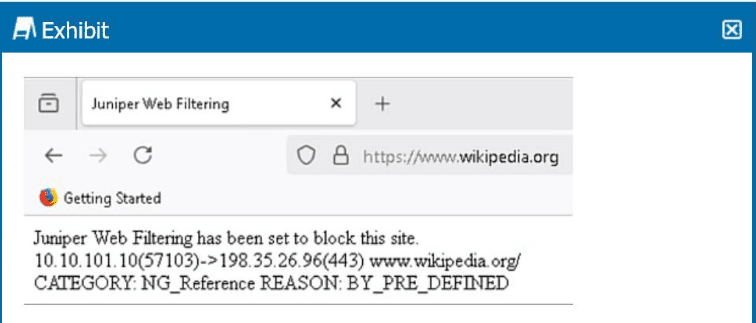
Referring to the exhibit, which two statements are correct? (Choose two.)
A. The URL matches a predefined Web filtering category.
B. The NextGen Web Filtering type is being used.
C. The SRX firewall does not have an SSL proxy configuration.
D. This is a custom Web filtering block message.
B. The NextGen Web Filtering type is being used.
Explanation:
Why A is correct:
The exhibit clearly shows CATEGORY: NG_Reference and REASON: BY_PRE_DEFINED. The BY_PRE_DEFINED reason indicates that the blocked website matched a predefined category within the Web filtering database, not a custom user‑defined category.
Why B is correct:
The category is labeled NG_Reference where NG stands for NextGen. This confirms that the NextGen Web Filtering type (powered by Juniper’s cloud‑based or local SurfControl database) is active on the SRX, as opposed to the legacy “Web filtering” (without NG) which uses different category naming conventions.
Why C is incorrect:
The traffic shown is HTTPS (port 443). To inspect or block an HTTPS URL, the SRX must have an SSL proxy configuration to decrypt, inspect, and re‑encrypt the traffic. If no SSL proxy were configured, the firewall would only see encrypted traffic and could not match a specific URL path or category. Since the exhibit shows a successful block with a category for www.wikipedia.org, SSL proxy must be present. Therefore C is false.
Why D is incorrect:
The REASON: BY_PRE_DEFINED explicitly means the match came from a predefined list — not a custom list. A custom block message would show something like REASON: BY_USER_DEFINED or refer to a custom URL category. Thus D is false.
References
Juniper TechLibrary – NextGen Web Filtering
“NextGen Web Filtering uses predefined URL categories (e.g., NG_Reference, NG_SocialNetworking). Block reason BY_PRE_DEFINED indicates a match with these categories.”
You are asked to reduce security configuration complexity on your external facing firewalls. You notice that a previous administrator included hundreds of private subnet NAT rules covering various RFC1918 addresses. You want to replace all these rules with a single rule covering all RFC1918 addresses. Which rule would you use in this scenario?
A. set security nat source rule-set private-to-pub rule RFC1918 match source-address [10.0.0.0/8 192.168.0.0/16 172.16.0.0/12]
B. set security nat source rule-set private-to-pub rule RFC1918 match source-address [10.0.0.0/8 192.16.0.0/12 172.168.0.0/16]
C. set security nat source rule-set private-to-pub rule RFC1918 match source-address [10.0.0.0/8 172.168.0.0/16 192.0.2.0/24 203.1.113.0/24]
D. set security nat source rule-set private-to-pub rule RFC1918 match source-address [10.0.0.0/8 192.168.0.0/16 172.16.0.0/12 192.0.2.0/24]
Explanation:
RFC 1918 defines the following IPv4 address ranges reserved for private internets:
10.0.0.0/8 (10.0.0.0 – 10.255.255.255)
172.16.0.0/12 (172.16.0.0 – 172.31.255.255)
192.168.0.0/16 (192.168.0.0 – 192.168.255.255)
Option A correctly lists all three of these ranges in proper CIDR notation inside a Juniper source NAT match condition.
Why the other options are incorrect:
B – Uses 192.16.0.0/12 (wrong – that is not a standard private block; 192.16.0.0/12 is mostly public) and 172.168.0.0/16 (wrong – that’s a public /16, not the private 172.16.0.0/12).
C – Includes 192.0.2.0/24 and 203.1.113.0/24, which are not RFC 1918 addresses (192.0.2.0/24 is documentation/TEST-NET, 203.1.113.0/24 is public), and misses the correct 172.16.0.0/12.
D – Adds 192.0.2.0/24 unnecessarily, which is not private, though the RFC 1918 ranges are correct. It includes an extra non-RFC1918 range, making it inaccurate for “all RFC1918 addresses only.”
Reference:
Juniper TechLibrary— Source NAT Configuration → match source-address supports multiple addresses in a list.
RFC 1918 — Address Allocation for Private Internets.
Click the Exhibit button.

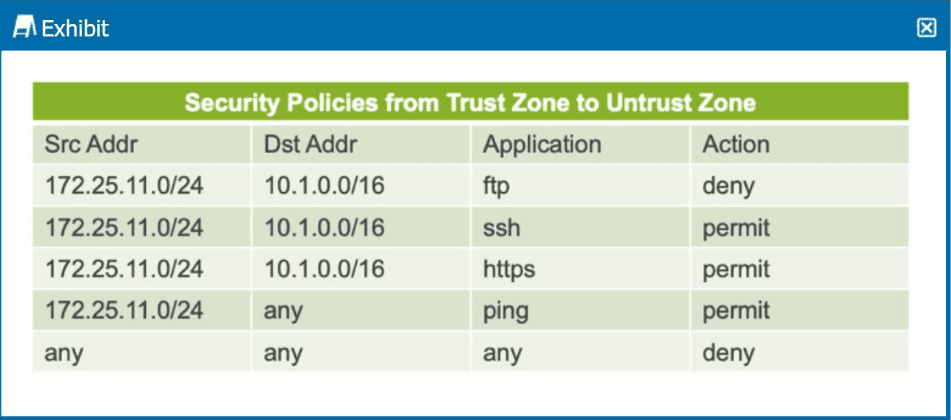
The exhibit shows a table representing security policies from the trust zone to the untrust
zone.
In this scenario, which two statements are correct? (Choose two.)
A. SSH requests from the source IP address of 172.25.11.10 are permitted to the destination IP address of 10.1.0.10.
B. Ping command requests from the source IP address of 172.25.11.100 are denied to the destination IP address of 10.1.0.10.
C. FTP requests from the source IP address of 10.1.0.10 are permitted to the destination IP address of 172.25.11.100.
D. FTP requests from the source IP address of 172.25.11.11 are denied to the destination IP address of 10.1.0.10.
Explanation:
How Juniper security policies work: Policies are evaluated from top to bottom. The first rule that matches source address, destination address, and application determines the action. Later rules are ignored for that traffic. The exhibit shows Trust → Untrust policies only.
✅Option A (Correct): SSH from 172.25.11.10 (within 172.25.11.0/24) to 10.1.0.10 (within 10.1.0.0/16) matches the second policy (ssh permit). Action = permit. No earlier deny for SSH exists.
✅Option D (Correct): FTP from 172.25.11.11 to 10.1.0.10 matches the first policy (ftp deny). Action = deny immediately. Later SSH or ping policies are irrelevant because the first match already denied.
❌Why B is incorrect: Ping from 172.25.11.100 to 10.1.0.10 matches the fourth policy (ping permit), not deny. The traffic never reaches the final deny-all. Action = permit, not denied.
❌Why C is incorrect: FTP from 10.1.0.10 (source) to 172.25.11.100 (destination) is Untrust → Trust traffic. The exhibit only shows Trust → Untrust policies. Juniper policies are zone-direction specific. Without an explicit policy for Untrust → Trust, the implicit deny applies. Option incorrectly claims "permitted" with no evidence.
References
Juniper TechLibrary — Security Policies Overview: "Policy evaluation is first match. Once a match is found, no further policies are evaluated."
You are asked to enable trace options to debug the packet flow. In this scenario, which flag would you configure at the [edit security flow traceoptions] hierarchy?
A. packet-dump
B. general
C. state
D. basic-datapath
Explanation:
When debugging packet flow on Juniper SRX firewalls, the packet-dump flag captures detailed packet header information as traffic passes through the security flow. This includes source/destination IP addresses, ports, protocol information, and interface details — essential for tracing packet flow problems.
Why packet-dump is correct:
This flag specifically traces the actual packet forwarding path, showing how packets enter, are processed by security policies, NAT, ALGs, and exit the device. It's the primary flag used for step-by-step packet flow debugging.
Why other options are incorrect:
B. general:
Provides high-level trace information about security flow events (startup, shutdown, errors) but no packet details. Insufficient for debugging actual packet flow.
C. state:
Traces session state transitions (NEW, ESTABLISHED, CLOSED) and TCP state changes. Useful for session issues but does not show packet payload or header details needed for flow debugging.
D. basic-datapath:
Traces low-level datapath operations like interface queue events and packet descriptor handling. This is too low-level (kernel/forwarding plane) and not available at the edit security flow traceoptions hierarchy; it exists under edit interfaces or edit forwarding-options on some platforms.
Reference
Juniper TechLibrary — Security Flow Traceoptions:
"To trace packet flow, configure the packet-dump flag. This flag enables detailed packet header information in the trace logs."
In which order does Junos OS process the various forms of NAT?
A. static NAT, destination NAT, source NAT
B. destination NAT, source NAT, static NAT
C. source NAT, static NAT, destination NAT
D. source NAT, destination NAT, static NAT
Explanation:
Junos OS processes NAT in the following order on the ingress (input) side of the security flow:
1. Static NAT — Processed first because it provides a fixed 1:1 mapping. Static NAT is applied at the earliest stage, rewriting both source and destination (or one direction) before route lookup and policy evaluation.
2. Destination NAT — Applied after static NAT but before routing. DNAT changes the destination IP address (e.g., for a public VIP mapped to an internal server). The routing table then sees the translated destination for forwarding decisions.
3. Source NAT — Applied last, typically on the egress (output) side after routing and security policy lookup. SNAT changes the source IP address (e.g., private to public for internet access).
Why the other options are incorrect:
B (Dst NAT, Src NAT, Static NAT):
Incorrect because static NAT must occur first; DNAT cannot precede static NAT correctly.
C (SrNAT, Static NAT, Dst NAT):
Incorrect because source NAT is applied last in most flows; applying it first would cause routing and policy mismatches.
D (Src NAT, Dst NAT, Static NAT):
Incorrect for the same reason — source NAT cannot come before static or destination NAT in the processing order.
Reference
Juniper TechLibrary — NAT Processing Order:
"NAT processing occurs in the following sequence: static NAT first, then destination NAT, and finally source NAT. This order ensures proper route lookup and security policy application."
Click the Exhibit button.

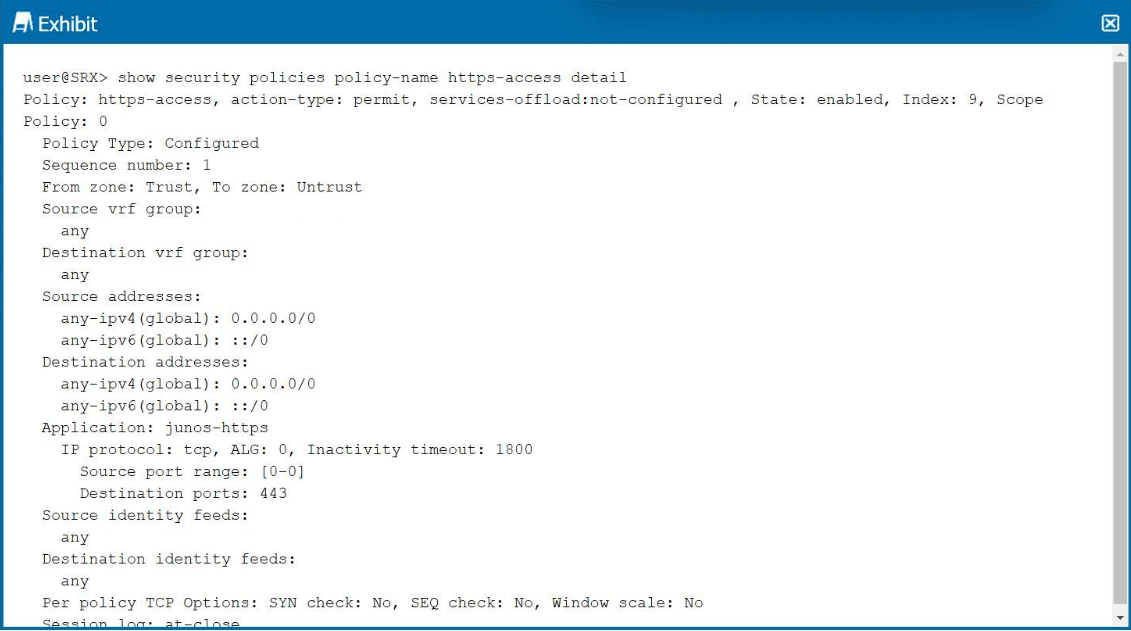
Referring to the exhibit, which two statements are correct? (Choose two.)
A. This security policy uses a non-default inactivity timeout.
B. This security policy is the second security policy in the list.
C. This security policy permits HTTPS traffic.
D. This security policy is a zone-based security policy.
Explanation:
C. This security policy permits HTTPS traffic. ✅ Correct
The policy shows action-type: permit and Application: junos-https. The junos-https application matches TCP destination port 443 (standard HTTPS). Therefore, the policy explicitly permits HTTPS traffic.
D. This security policy is a zone-based security policy. ✅ Correct
The output clearly shows From zone: Trust and To zone: Untrust. Juniper SRX policies are zone-based by design, meaning they are applied between security zones (Trust → Untrust in this case), not just IP addresses or interfaces.
Why A is incorrect ❌
The policy shows Inactivity timeout: 1800. 1800 seconds = 30 minutes.
The default inactivity timeout for TCP services like HTTPS on Junos is typically 1800 seconds (30 minutes) unless modified globally or per application.
Since no custom timeout value is explicitly configured above the default, this is the default behavior, not a non-default timeout.
A non-default value would appear differently (e.g., explicitly configured inactivity-timeout 3600).
Important note: The screen text truncation ("The screen is too small...") may cut off custom settings, but based on displayed data, 1800 matches standard defaults for TCP/HTTPS.
Why B is incorrect ❌
The output shows Sequence number: 1. This indicates this is the first policy (index 1) in the policy order for its from/to zone pair, not the second. Sequence numbers start at 1 unless renumbered.
References
Juniper TechLibrary — Security Policy Output:
"action-type indicates permit or deny. junos-https is a predefined application for TCP 443."
Juniper — Default Inactivity Timeout:
Default TCP session inactivity timeout = 1800 seconds (30 minutes) unless overridden by application or global settings.
| Page 1 out of 9 Pages |
Why Take This JN0-232 Security, Associate (JNCIA-SEC) Practice Exam Before the Real Exam?
This free Security, Associate (JNCIA-SEC) practice test gives you three critical advantages:
- Real format, real pressure – Identical question structure and difficulty to the official exam
- Instant gap detection – You'll know exactly which topics need more attention
- Learn as you go – Every answer includes a clear explanation, so you're studying while testing