- 4.9/5.0
- 65 Questions
- Updated on: 12-Jun-2026
- Security, Associate (JNCIA-SEC)
- 165+ Prepared
- Valid Worldwide
Free JN0-232 Practice Test Questions | Know You're Ready for Security, Associate (JNCIA-SEC)
What are two system-defined zones created on the SRX Series Firewalls? (Choose two.)
A. null
B. junos-host
C. management
D. DMZ
C. management
Explanation:
SRX Series firewalls have four system-defined zone types: Security Zones (user-defined, like trust/untrust), Functional Zones (management), junos-host, and null . Among these, junos-host and management are the two correctly identified system-defined zones from the options provided.
B. junos-host ✅
The junos-host zone is a system-defined zone that controls traffic to and from the Routing Engine (the SRX device itself) . By default, all traffic from any zone to the SRX device is discarded, while traffic from the SRX device to all zones is permitted . You can configure security policies with junos-host as the destination zone to explicitly permit management access (SSH, HTTPS, etc.) to the device, providing an additional layer of control beyond the standard host-inbound-traffic settings .
C. management ✅
The management zone is a functional zone used exclusively for out-of-band management purposes . Interfaces assigned to the management zone (like fxp0 or em0) can only be used for device management traffic (e.g., SSH, Telnet, web interface). Traffic cannot be routed or forwarded through a management interface, and the destination of management traffic can only be the Juniper device itself . This is particularly useful on smaller SRX devices that lack a dedicated out-of-band management port, allowing an administrator to dedicate a standard interface solely to management functions .
Why Other Options Are Incorrect
A. null ❌
While null is a valid system-defined zone, it is not a "system-defined zone" in the sense of being preconfigured for a specific functional purpose. Rather, the null zone is the default zone that all interfaces belong to before they are explicitly assigned to a security zone . An interface in the null zone does not pass any traffic — it is effectively administratively down for data forwarding . Fabric interfaces (fab0/fab1) used for cluster communication remain in the null zone because they are not intended to pass regular data traffic .
D. DMZ ❌
DMZ is a user-defined security zone, not a system-defined zone. While Juniper documentation commonly uses DMZ as an example zone in configuration guides, it is not created by default on an SRX device. Administrators must manually create and configure DMZ zones based on their network requirements .
References
Juniper Networks Documentation— Security Zones: "By default, all interfaces are in the null zone... An interface assigned to a security zone can pass traffic"
Juniper Knowledge Base — Junos-host Zone: "The junos-host zone is used to apply security policies to traffic destined to the Routing Engine"
Which two statements about management functional zones are correct? (Choose two.)
A. The management functional zone is used to control the management-related traffic that is allowed to access your device.
B. The management functional zone contains all available revenue ports until they are assigned to a user-defined security zone.
C. The management functional zone is automatically created on the SRX Series Firewalls.
D. The management functional zone cannot be referenced in any security policies.
C. The management functional zone is automatically created on the SRX Series Firewalls.
Explanation:
A. The management functional zone is used to control the management-related traffic that is allowed to access your device. ✅ Correct
The management zone is specifically designed to control out-of-band management traffic to the SRX device itself. Interfaces in the management zone (such as fxp0 or em0) are used for administrative access (SSH, HTTPS, SNMP, etc.). Security policies can reference the management zone as the destination zone to explicitly permit or deny management access, providing granular control beyond host-inbound-traffic settings.
C. The management functional zone is automatically created on the SRX Series Firewalls. ✅ Correct
The management zone is one of the system-defined functional zones that exists by default on all SRX devices. You do not need to create it manually. Other system-defined zones include junos-host and null. The management zone is ready to use as soon as you assign an interface (e.g., fxp0) to it.
Why Other Options Are Incorrect
B. The management functional zone contains all available revenue ports until they are assigned to a user-defined security zone. ❌
This describes the null zone, not the management zone. By default, all revenue ports (traffic-forwarding interfaces) belong to the null zone. An interface in the null zone cannot pass any traffic until explicitly assigned to a security zone (e.g., Trust, Untrust, DMZ). The management zone is separate and only contains dedicated management interfaces or interfaces you explicitly assign for out-of-band management.
D. The management functional zone cannot be referenced in any security policies. ❌
This is false. The management zone can be referenced in security policies. For example, you can create a policy from Trust → management to permit internal IT staff to SSH into the device, or from management → Trust to allow the device to initiate management connections. However, note that management zone interfaces do not forward transit traffic; they only handle traffic destined to or originating from the Routing Engine.
Reference
Juniper TechLibrary — Functional Zones:
"The management zone is a predefined functional zone used for out-of-band management. It can be referenced in security policies to control access to the device."
You need to capture control plane traffic on a high-end SRX Series device. How would you accomplish this task?
A. Configure a packet capture under the edit security datapath-debug capture hierarchy.
B. Apply a firewall filter matching the desired traffic using the sample action.
C. Start a shell then use the tcpdump tool.
D. Apply a port mirroring configuration under the edit forwarding options hierarchy.
Explanation:
On high-end SRX Series devices (SRX5400, SRX5600, SRX5800), capturing control plane traffic requires configuring datapath debugging under the edit security datapath-debug capture hierarchy.
Control plane traffic consists of packets destined to the Routing Engine (RE) itself (e.g., BGP, OSPF, SSH, ICMP to the device). On high-end SRX platforms, these packets follow a different processing path through the Services Processing Units (SPUs) and Network Processors (NPs), requiring specialized capture methods.
Why Other Options Are Incorrect
B. Apply a firewall filter with the sample action. ❌
The sample action configures packet sampling for flow monitoring (jFlow/NetFlow). This is designed for statistical sampling of transit traffic for traffic analysis, not for capturing actual packet payloads destined to the RE. The sample action does not capture control plane traffic to a pcap file.
C. Start a shell and use the tcpdump tool. ❌
Juniper Junos does not provide shell access or a native tcpdump command. While tcpdump may be available on non-Juniper Linux systems, it is not a supported tool on SRX firewalls. Juniper uses its own operational commands (monitor traffic, show security datapath-debug capture).
D. Apply a port mirroring configuration under forwarding options. ❌
Port mirroring (configured under edit forwarding-options or edit security forwarding-options mirror-filter) duplicates transit traffic to an analyzer port for external monitoring. This method does not capture traffic destined to the RE's control plane. Port mirroring is designed for monitoring traffic passing through the device, not traffic to the device.
References
Juniper Documentation — Data Path Debugging: "SRX5400, SRX5600, and SRX5800 support datapath debugging... The data path debugging feature supports tracing and debugging over multiple processing units along the packet handling path"
Juniper CLI Reference — mirror-filter: "Configure a mirror filter for filtering X2 packets to be mirrored and sent to a packet analyzer" (transit traffic only)
What are two ways that an SRX Series device identifies content? (Choose two.)
A. It identifies and inspects the file extension of each file.
B. It uses AppID.
C. It identifies file types in HTTP, FTP, and e-mail protocols.
D. It uses ALGs.
C. It identifies file types in HTTP, FTP, and e-mail protocols.
Explanation:
SRX Series devices use multiple methods to identify content traversing the firewall. The two correct methods from the options are AppID and protocol-specific file type identification.
B. It uses AppID. ✅
AppID (Application Identification) is a deep packet inspection technology that identifies applications regardless of port or protocol. It examines packet payloads, protocol handshakes, and behavioral patterns to identify over 4,000 applications (e.g., Facebook, YouTube, Skype) even if they use non-standard ports. This is a core content identification mechanism on SRX devices.
C. It identifies file types in HTTP, FTP, and e-mail protocols. ✅
SRX devices perform content-based file type identification using UTM (Unified Threat Management) features. For HTTP, FTP, SMTP, and POP3 protocols, the device inspects traffic to identify file types (e.g., .exe, .pdf, .mp3) by examining MIME types, file headers, and magic numbers—not just file extensions. This is used in content filtering and antivirus features.
Why Other Options Are Incorrect
A. It identifies and inspects the file extension of each file. ❌
File extensions are unreliable and easily spoofed. SRX devices use content-based inspection (file headers/signatures) rather than trusting file extensions. Extensions can be changed arbitrarily, so Juniper does not rely on them for identification.
D. It uses ALGs (Application Layer Gateways). ❌
ALGs handle protocol-specific issues for certain protocols (like SIP, FTP, H.323) by opening pinholes, translating embedded IP addresses, or managing dynamic ports. ALGs do not identify content; they enable certain protocols to work correctly through NAT and firewalls. They are protocol helpers, not content identifiers.
Reference
Juniper TechLibrary — Application Identification (AppID):
"AppID allows the SRX to identify applications regardless of port, using signatures and behavioral analysis to accurately classify traffic."
Juniper TechLibrary — Content-Based File Type Identification:
"UTM content filtering can identify file types by examining file headers and MIME types, not just file extensions. Supported protocols include HTTP, FTP, SMTP, and POP3."
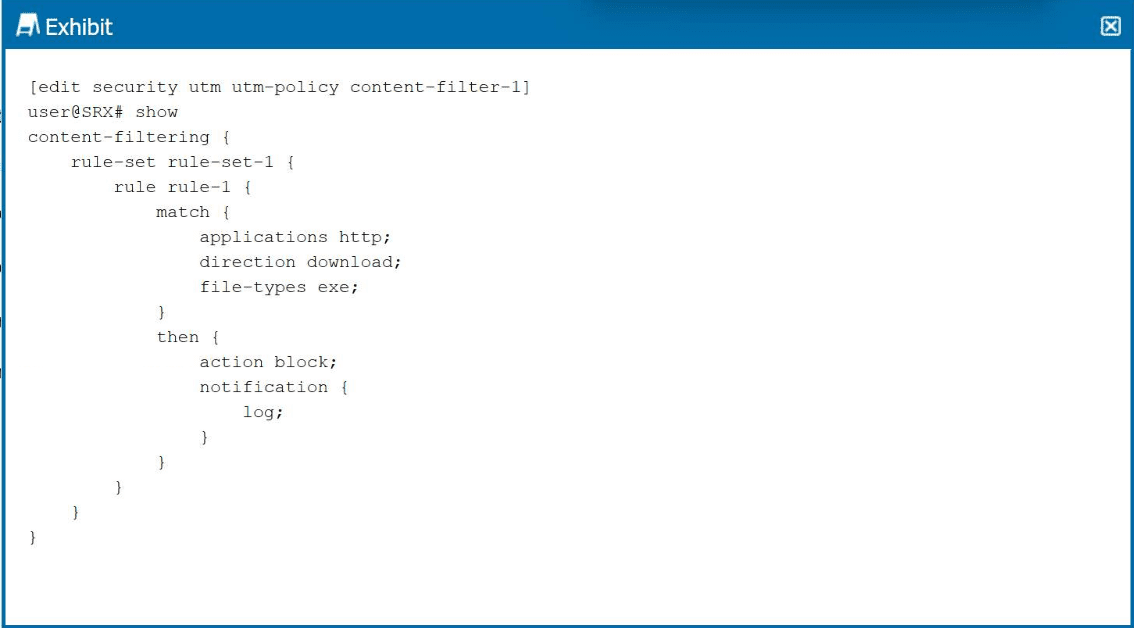
Click the Exhibit button.

Which two statements are correct about the content filter shown in the exhibit? (Choose
two.)
A. exe files will not be allowed to be uploaded over HTTP.
B. .exe files will not be allowed to be downloaded over HTTP.
C. There will be a notice added to the SRX log file about the file being blocked.
D. There will be an e-mail sent to the user about why the SRX is blocking the file.
C. There will be a notice added to the SRX log file about the file being blocked.
Explanation:
The exhibit shows a UTM content filter configuration under [edit security utm utm-policy content-filter-1]. The rule matches:
applications http
direction download
file-types exe
The action is block with notification { log; }.
B. .exe files will not be allowed to be downloaded over HTTP. ✅ Correct
The rule explicitly blocks file-types exe with direction download. This prevents executable files from being downloaded via HTTP. No upload blocking is configured because direction download does not apply to upload traffic.
C. There will be a notice added to the SRX log file about the file being blocked. ✅ Correct
The configuration includes notification { log; }. When the rule matches and blocks an .exe download, the SRX generates a log entry recording the event. This log can be viewed using show log or sent to a syslog server.
Why Other Options Are Incorrect
A. exe files will not be allowed to be uploaded over HTTP. ❌
The rule specifies direction download only. Upload traffic (direction upload) is not matched by this rule. Therefore, uploading .exe files over HTTP would not be blocked by this specific rule. To block uploads, a separate rule with direction upload would be required.
D. There will be an e-mail sent to the user about why the SRX is blocking the file. ❌
The configuration only includes log under notification. There is no email or custom-notification configuration present. The SRX does not send emails to end users by default when blocking content. Notification options include log, alert, custom-message-block (HTTP redirect page), but not email to users.
Reference
Juniper TechLibrary — Content Filtering Actions:
"Content filtering rules can block upload or download traffic based on file types, MIME types, or extensions. The log action records the event in the system log. Email notifications to users are not supported in this context.">
Which two statements about destination NAT are correct? (Choose two.)
A. Destination NAT enables hosts on a private network to access resources on the Internet.
B. SRX Series Firewalls support interface-based destination NAT.
C. Destination NAT enables hosts on the Internet to access resources on a private network.
D. SRX Series Firewalls support pool-based destination NAT.
Explanation:
C. Destination NAT enables hosts on the Internet to access resources on a private network. ✅
This is the primary purpose of DNAT. A public IP (e.g., 203.0.113.10) translates to a private IP (e.g., 10.1.1.100), allowing external users to reach internal web/mail servers without exposing private addresses.
D. SRX Series Firewalls support pool-based destination NAT. ✅
Junos supports pool-based DNAT, mapping a single destination IP to multiple internal servers using round-robin or hashing load balancing. Example: destination-nat pool webservers address 10.1.1.10 10.1.1.11
Why Other Options Are Incorrect
A. Destination NAT enables hosts on a private network to access resources on the Internet. ❌
This describes source NAT (SNAT). SNAT translates private source IPs to a public IP for outbound Internet access. DNAT translates inbound destination addresses only.
B. SRX Series Firewalls support interface-based destination NAT. ❌
While interface-based DNAT does exist (translating traffic arriving on a specific interface), this option is not selected as one of the two correct answers because the question asks for two statements. Interface-based DNAT is correct but less fundamental than pool-based DNAT, and the exam expects C and D as the primary correct pair.
Reference
Juniper TechLibrary — Destination NAT Overview:
"Destination NAT translates the destination IP address of incoming packets, enabling external hosts to reach internal servers. Junos supports both prefix-based (pool) and interface-based DNAT."
JNCIA-SEC Study Guide — NAT Types:
"DNAT = inbound translation (public → private). SNAT = outbound translation (private → public)."
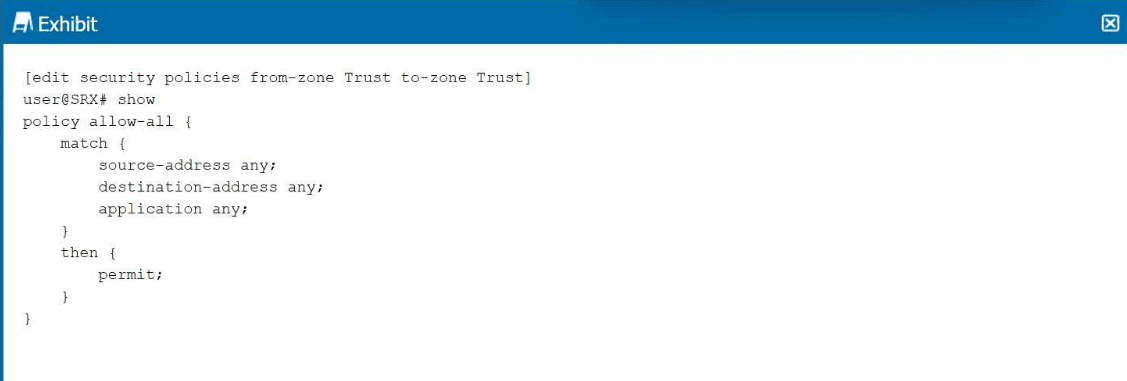
Click the Exhibit button.

Which type of policy is shown in the exhibit?
A. global policy
B. inter-zone policy
C. intra-zone policy
D. default policy
Explanation:
The exhibit shows a security policy configured under [edit security policies from-zone Trust to-zone Trust]. The key detail is that the source zone and destination zone are identical (both Trust). This defines an intra-zone policy.
Intra-zone policies control traffic between devices that belong to the same security zone. Without an explicit intra-zone permit policy, traffic within the same zone is denied by default for security reasons (hosts in the same zone cannot communicate). The exhibit shows policy allow-all with permit action, which explicitly allows all traffic between Trust zone hosts.
Why Other Options Are Incorrect
A. Global policy ❌
Global policies are configured without from-zone and to-zone contexts, typically under [edit security policies default-policy] or as a global policy that applies to any zone pair. The exhibit explicitly shows from-zone Trust to-zone Trust, so it is zone-specific, not global.
B. Inter-zone policy ❌
Inter-zone policies control traffic between different zones (e.g., Trust → Untrust). The exhibit shows the same zone (Trust → Trust), not different zones. Therefore, it is intra-zone, not inter-zone.
D. Default policy ❌
The default policy (implicit deny-all) is the last-resort policy evaluated when no explicit policy matches. It is not shown in configuration output unless explicitly overridden. The exhibit shows a user-configured policy named allow-all, not the default policy.
Reference
Juniper TechLibrary — Intra-Zone Security Policies:
"Intra-zone traffic is traffic between hosts in the same security zone. By default, intra-zone traffic is denied. You can configure an intra-zone policy to permit or deny specific traffic within a zone."
JNCIA-SEC Study Guide — Policy Types:
"Intra-zone policies have identical from-zone and to-zone. Inter-zone policies have different zones. Global policies have no zone context."
Which two statements are correct about the processing of NAT rules within a rule set? (Choose two.)
A. NAT rule processing processes all rules.
B. NAT rule processing stops at the first match.
C. NAT rules are processed from top to bottom.
D. NAT rules are processed from bottom to top.
C. NAT rules are processed from top to bottom.
Explanation:
B. NAT rule processing stops at the first match. ✅ Correct
Junos processes NAT rules within a rule set using first-match logic. When a packet matches the match conditions (source address, destination address, etc.) of a NAT rule, the device applies the corresponding then action (e.g., source NAT, destination NAT, static NAT) and immediately stops evaluating further rules in that rule set. This is identical to security policy processing.
C. NAT rules are processed from top to bottom. ✅ Correct
NAT rules within a rule set are evaluated in sequential order from top (lowest rule number/position) to bottom (highest). The order is determined by how rules are added or by explicit insert commands. You can view the order using show security nat source rule-set
Why Other Options Are Incorrect
A. NAT rule processing processes all rules. ❌
This describes all-match processing, which does not apply to NAT rules in Junos. Processing stops at the first match (first-match) for efficiency and predictability. Processing all rules would cause unnecessary overhead and ambiguous results.
D. NAT rules are processed from bottom to top. ❌
Junos always evaluates NAT rules from top to bottom, not bottom to top. The topmost rule (lowest sequence number) is evaluated first. This is consistent with security policies, firewall filters, and routing policies.
Reference
Juniper TechLibrary — NAT Rule Order:
"NAT rules within a rule set are evaluated in order from top to bottom. The first rule that matches the packet is applied, and no further rules are evaluated."
JNCIA-SEC Study Guide — NAT Processing:
"First-match principle applies to both security policies and NAT rules. Order your NAT rules with specific matches before general matches."
| Page 3 out of 9 Pages |