- 4.9/5.0
- 65 Questions
- Updated on: 12-Jun-2026
- Security, Associate (JNCIA-SEC)
- 165+ Prepared
- Valid Worldwide
Free JN0-232 Practice Test Questions | Know You're Ready for Security, Associate (JNCIA-SEC)
What is the purpose of a feature profile in a UTM configuration?
A. It applies a UTM feature to a security policy.
B. It applies a UTM feature to protocol traffic.
C. It defines the operation of a specific UTM feature.
D. It defines an object list.
Explanation:
A feature profile in a Juniper UTM configuration defines the operational parameters of a specific UTM feature, such as anti-spam, antivirus, content filtering, or web filtering.
The configuration hierarchy clearly shows this relationship. Feature profiles are created at the [edit security utm feature-profile] hierarchy, where you define exactly how a UTM feature should behave. For example, within this hierarchy, an anti-spam feature profile defines blacklists, whitelists, and spam actions like blocking or tagging email headers. A web-filtering feature profile defines default actions (permit, block, log-and-permit), fallback settings, timeouts, and custom block messages.
Why Other Options Are Incorrect
A. It applies a UTM feature to a security policy.
❌ This describes the role of a UTM policy ([edit security utm utm-policy]), not a feature profile. The UTM policy acts as a container that references feature profiles, and it is this policy that is attached to a security policy.
B. It applies a UTM feature to protocol traffic.
❌ Feature profiles define operational parameters, but they do not directly apply to traffic. Traffic inspection is triggered only after a security policy references a UTM policy that contains the feature profile.
D. It defines an object list.
❌ Object lists (like URL patterns or custom URL categories) are defined under [edit security utm custom-objects]. Feature profiles reference these objects but do not define them.
Reference
Juniper TechLibrary — UTM Feature Profiles Overview:
"Feature profiles define the operational parameters for a specific UTM feature."
Juniper Support Portal — UTM Web Filtering Configuration:
"The core enforcement object. The profile contains category-to-action mappings, fallback settings, timeout values, and default actions."
You are asked to create a security policy that controls traffic allowed to pass between the Internet and private security zones. You must ensure that this policy is evaluated before all other policy types on your SRX Series device. In this scenario, which type of security policy should you create?
A. routing policy
B. default policy
C. zone policy
D. global policy
Explanation:
On Juniper SRX Series devices, security policies are evaluated in the following order of precedence:
Zone-based policies (highest precedence)
Global policies (lower precedence)
Zone-based policies are applied between specific source and destination zones (e.g., Trust → Untrust). These policies are evaluated first before any global policy when traffic matches their zone pair. They provide the most granular control and are the primary mechanism for securing inter-zone traffic.
Why Other Options Are Incorrect
A. Routing policy
❌ Routing policies (e.g., export/import policies under [edit policy-options]) control route advertisement and selection in routing protocols. They have no role in security policy evaluation or traffic filtering.
B. Default policy
❌ The default policy (either implicit deny-all or an explicitly configured default-policy) applies only after all configured zone-based and global policies fail to match. It is evaluated last, not first.
D. Global policy
❌ Global security policies (configured without specific zones or with default-policy) are evaluated after all zone-based policies for the relevant zone pair. They cannot override a zone-specific match, nor are they evaluated first.
Reference
Juniper TechLibrary — Security Policy Evaluation Order:
"The SRX Series evaluates security policies in the following order: zone-based policies first (most specific), followed by global policies. The default policy is evaluated last."
Which two statements about global security policies are correct? (Choose two.)
A. The from-zone and to-zone contexts are not required for a global security policy.
B. Global security policies require specific zone contexts.
C. Global policies are processed before zone-based security policies.
D. You can use both zone-based security policies and global security policies at the same time.
Explanation:
A. The from-zone and to-zone contexts are not required for a global security policy. ✅ Correct
Global security policies are defined without specifying source and destination zones. They apply to any zone pair unless a more specific zone-based policy matches. The configuration uses default-policy or global policy statements at the [edit security policies] hierarchy level, not under specific from-zone to to-zone contexts.
D. You can use both zone-based security policies and global security policies at the same time. ✅ Correct
Junos allows coexistence of zone-based policies and global policies. Zone-based policies are evaluated first for traffic matching their specific zone pair. If no match occurs, global policies are then evaluated. This provides flexibility — zone policies for specific inter-zone traffic control, global policies as fallback or catch-all rules.
Why Other Options Are Incorrect
B. Global security policies require specific zone contexts.
❌ This is the opposite of correct. Requiring zone contexts (from-zone and to-zone) defines a zone-based policy, not a global policy. Global policies explicitly omit zone contexts.
C. Global policies are processed before zone-based security policies. ❌ Incorrect. The evaluation order is:
Zone-based policies (highest precedence, specific zone pairs)
Global policies (lower precedence, any zone pair)
Default policy (implicit deny, evaluated last)
Zone-based policies always take precedence over global policies for matching traffic.
Reference
Juniper TechLibrary — Global Security Policies:
"Global policies are not bound to specific zones and are evaluated after zone-based policies. You can configure both types simultaneously."
What is transit traffic in the Junos OS?
A. It is traffic that is processed solely through the forwarding plane.
B. It is traffic that is rate-limited to prevent denial-of-service attacks.
C. It is traffic that is processed by the control plane.
D. It is traffic that requires special handling by the Routing Engine.
Explanation:
In Junos OS, transit traffic is traffic that passes through the device from one interface to another (e.g., from a Trust zone to an Untrust zone) without being destined to the device itself. This traffic is processed solely through the forwarding plane (Packet Forwarding Engine — PFE) in most cases, especially for high-performance packet flow.
Why Other Options Are Incorrect
B. It is traffic that is rate-limited to prevent denial-of-service attacks. ❌
Rate-limiting is an optional security feature (e.g., screen options, policers) applied to some transit traffic, but it is not the definition of transit traffic. Transit traffic may or may not be rate-limited depending on configuration.
C. It is traffic that is processed by the control plane. ❌
This describes exception traffic or RE-directed traffic (e.g., ICMP errors, BGP updates, fragmented packets needing reassembly). Standard transit traffic is not processed by the control plane.
D. It is traffic that requires special handling by the Routing Engine. ❌
Only traffic that triggers exceptions (e.g., no session match, destined to local interface, protocols requiring RE processing) gets special RE handling. Normal transit traffic does not require this.
Reference
Juniper TechLibrary — Transit Traffic:
"Transit traffic is processed exclusively in the Packet Forwarding Engine; the Routing Engine is not in the data path for forwarded packets."
Your company is acquiring a smaller company that uses the same private address range that your company currently uses in its North America division. You have a limited number of public IP addresses to use for the acquisition. You want to allow the new acquisition's users to connect to the existing services in North America. Which two features would you enable on your SRX Series Firewall to accomplish this task? (Choose two.)
A. IDP
B. NAT
C. BGP
D. PAT
D. PAT
Explanation:
Your scenario describes overlapping private IP addresses between two companies. The North America division uses certain RFC 1918 addresses, and the newly acquired company uses the same range. Users from the acquisition need to connect to existing services in North America. With a limited number of public IPs available, you need both address translation and port multiplexing.
B. NAT (Network Address Translation) ✅
NAT is required to translate overlapping addresses into unique or non-conflicting addresses. Specifically, you would use source NAT (for acquisition users accessing North America services) and potentially destination NAT (if North America services need to respond correctly). A common solution is double NAT or NAT-44 (NAT-Source) to avoid overlap conflicts.
D. PAT (Port Address Translation) ✅
PAT is a form of dynamic source NAT where multiple private IPs are mapped to a single (or few) public IPs using unique source ports. Given your limited public IP addresses, PAT allows many acquisition users to share a single public IP. This is configured in Junos as source NAT with pooled or overload option — often called NAPT (Network Address Port Translation).
Why Other Options Are Incorrect
A. IDP (Intrusion Detection and Prevention) ❌
IDP inspects traffic for malicious patterns and blocks attacks. It does nothing to resolve IP address overlap or allow connectivity when both sides use the same private range.
C. BGP (Border Gateway Protocol) ❌
BGP is a dynamic routing protocol used to exchange routes between autonomous systems. It does not translate IP addresses. Overlapping address space causes route conflicts that BGP cannot resolve without NAT.
Reference
Juniper TechLibrary — Resolving Overlapping IP Addresses with NAT:
"Source NAT with PAT (port translation) allows overlapping private networks to communicate by translating source IPs and ports to a shared public IP pool."
You want to confirm that your SRX Series Firewall is connected to the SBL server. Which operational mode command would you use in this scenario?
A. show security utm anti-virus status
B. show security web filtering status
C. show security utm content-filtering statistics
D. show security utm anti-spam status
O.
Explanation:
To verify that your SRX Series Firewall is successfully connected to an SBL (Spam Block List) server for anti-spam filtering, you need to check the anti-spam status.
The Spam Block List (SBL) is a third-party server-based list of disallowed IP addresses that the anti-spam feature queries via DNS to identify spam sources. The command show security utm anti-spam status displays the operational status of the anti-spam feature, including whether it is active and properly connected to the configured SBL server.
Why Other Options Are Incorrect
A. show security utm anti-virus status ❌
This command displays status for the antivirus UTM feature, which is entirely unrelated to SBL. Antivirus uses different servers (e.g., Kaspersky or Sophos engines) and has no connection to Spam Block Lists.
B. show security web filtering status ❌
This command checks web filtering/surf control status—completely separate from anti-spam functionality. Web filtering is for HTTP/HTTPS content categorization, not email spam checking.
C. show security utm content-filtering statistics ❌
This command displays content filtering statistics (e.g., MIME type blocking, file extension filtering). It does not provide any SBL or anti-spam connection information.
Reference
Juniper TechLibrary — test security utm anti-spam command: "The anti-spam feature requires internet connectivity with the Spam Block List (SBL) server. Domain Name Service (DNS) must be available to access the SBL server."
Juniper TechLibrary — anti-spam feature configuration: "A license check for the antispam configuration is performed at the time of commit and provides a warning if a valid license is not installed on the device. Once a valid license is installed on the device then the custom antispam profile or the default antispam profile is able to process the traffic."
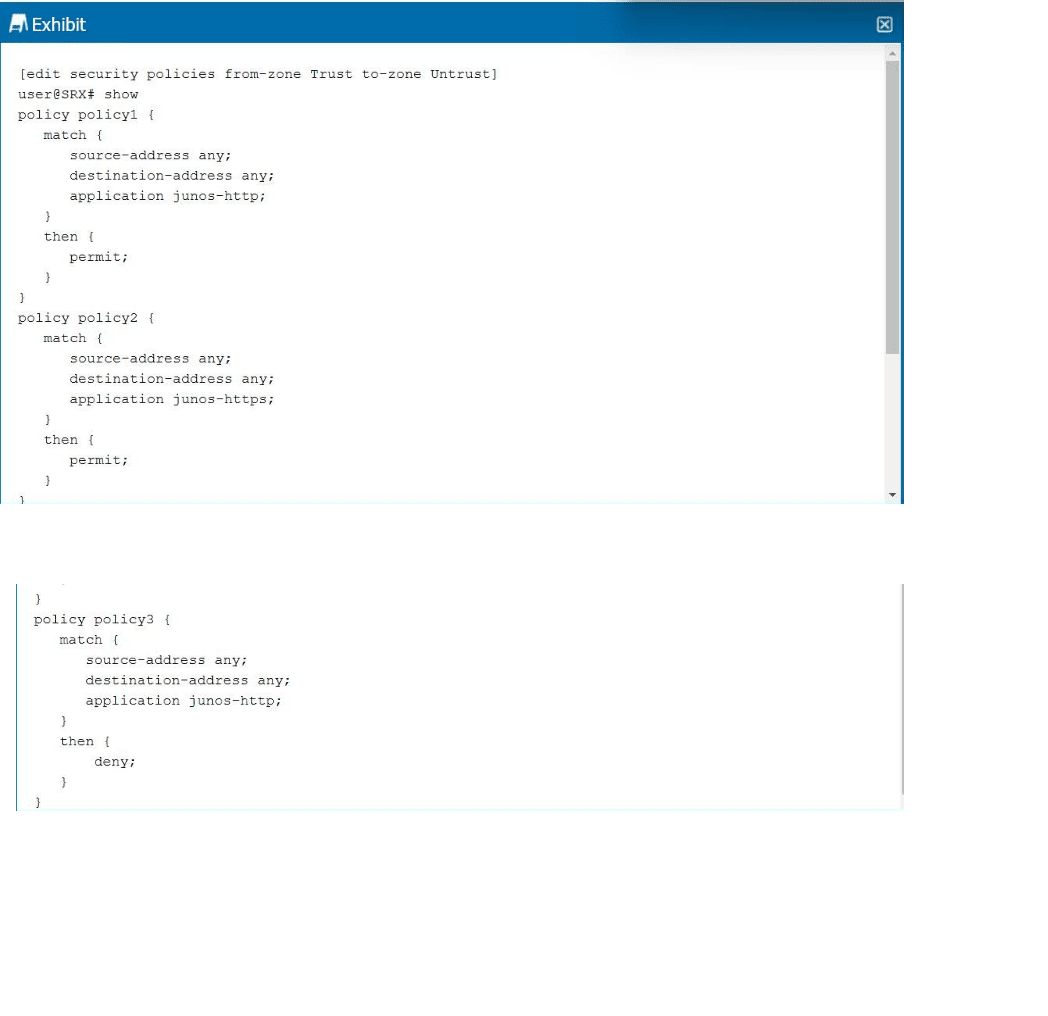
Click the Exhibit button.

Referring to the exhibit, which statement is correct?
A. policy3 will be shadowed because it matches the same application as policy1.
B. None of the policies will be shadowed.
C. policy1 will be shadowed because it matches the same application as policy3.
D. policy2 will be shadowed because it matches the same application as policy1.
Explanation:
Policy shadowing occurs when an earlier policy matches the same traffic as a later policy, making the later policy never evaluated. Juniper policies are processed top-down — first match wins.
In the exhibit:
policy1 (sequence 1): junos-http → permit
policy2 (sequence 2): junos-https → permit
policy3 (sequence 3): junos-http → deny
All policies use source-address any and destination-address any.
Why A is correct: policy3 matches the exact same traffic as policy1 (any/any/junos-http). Since policy1 is evaluated first and permits HTTP traffic, policy3 is never reached. It is completely shadowed.
Why Other Options Are Incorrect
B. None of the policies will be shadowed. ❌
False. policy3 is clearly shadowed by policy1. Shadowing exists here.
C. policy1 will be shadowed because it matches the same application as policy3. ❌
Shadowing affects later policies only, not earlier ones. policy1 comes first and always executes regardless of policy3.
D. policy2 will be shadowed because it matches the same application as policy1. ❌
policy2 matches junos-https; policy1 matches junos-http. Different applications. HTTPS traffic hits policy2; HTTP traffic hits policy1. No conflict, no shadowing.
Reference
Juniper TechLibrary — Policy Ordering and Shadowing:
"When multiple security policies exist, the first policy that matches the traffic determines the action. Identical or less-specific policies occurring later are never evaluated."
When a new traffic flow enters an SRX Series device, in which order are these processes performed?
A. screens security policies zones routes
B. screens routes zones security policies
C. routes zones screens security policies
D. screens zones security policies routes
Explanation:
When an SRX Series device processes the first packet of a new session, the order of operations is fixed. The correct sequence is Screens → Zones → Security Policies → Routes.
Why Options A, B, C Are Incorrect
A. screens → security policies → zones → routes ❌
Incorrect because zones must be determined before security policies can be evaluated. You cannot evaluate zone-based policies without knowing which zones are involved. This option places policies before zones, which is impossible.
B. screens → routes → zones → security policies ❌
Incorrect because route lookup occurs after policy evaluation, not before. The SRX must first determine if traffic is permitted before forwarding. Performing a route lookup for denied traffic wastes processing.
C. routes → zones → screens → security policies ❌
Incorrect because routes are the last step. Also, screens (attack detection) must occur before zones and policies to drop malicious traffic at the earliest possible stage.
References
Juniper TechLibrary — First Packet Processing:
"Screens are applied first, followed by zone determination, security policy lookup, and finally route lookup for permitted traffic. This order ensures efficient security processing before forwarding decisions."
| Page 2 out of 9 Pages |