• 4.9/5.0
  • 101 Questions
  • Updated on: 25-May-2026
  • Mist AI - Associate (JNCIA-MistAI)
  • 1101+ Prepared
  • Valid Worldwide

Free JN0-253 Practice Test Questions | Know You're Ready for Mist AI - Associate (JNCIA-MistAI)


This isn't guesswork. It's a mirror of the real Mist AI - Associate (JNCIA-MistAI) exam. Our free JN0-253 practice test questions reveals exactly what you know, what you don't, and what you need to drill before exam day. No surprises. No outdated Mist AI - Associate (JNCIA-MistAI) exam questions. Just a clear path to your Juniper certification.


What is the purpose of Audit Logs in Juniper Mist?

A. to record key performance events

B. to record security alerts

C. to record administrative activities

D. to record SLE violations

C.   to record administrative activities

Explanation::

In Juniper Mist, Audit Logs are designed to track and record all administrative activities performed within the Mist UI or via APIs. This includes actions such as:

User logins and logouts
Configuration changes (e.g., creating sites, adding devices, modifying WLAN templates)
Role changes and permission assignments
API token generation or revocation

Audit Logs serve a compliance and security monitoring purpose, allowing administrators to see who did what, when, and from which IP address. They are distinct from other logs that focus on network performance or security events.

Why the other options are incorrect:

A. to record key performance events
→ Performance-related events (e.g., AP uptime, client connection issues) are typically found in Marvis Actions or event logs, not in Audit Logs.

B. to record security alerts
→ Security alerts (e.g., rogue AP detection, WIDS/WIPS events) are captured in Marvis or security-specific logs within Mist.

D. to record SLE violations
→ SLE (Service Level Expectation) violations (e.g., high latency, poor throughput) are tracked in SLE dashboards and Marvis queries, not in Audit Logs.

Reference:

Juniper Mist documentation: "Audit Logs track all configuration and administration changes made by users or API calls."

JNCIA-MistAI exam blueprint: Section on Mist Platform Operations – understanding audit trails vs. performance/security logs.

Which two statements describe SLEs? (Choose two.)

A. SLEs use machine learning to provide a proactive approach to understanding the enduser experience.

B. SLEs use data science to troubleshoot network issues on an ad hoc basis.

C. The metrics analyzed to meet specific SLE goals are categorized into classifiers.

D. SLEs display a detailed list of Wi-Fi clients who have connected to the network.

A.   SLEs use machine learning to provide a proactive approach to understanding the enduser experience.
C.   The metrics analyzed to meet specific SLE goals are categorized into classifiers.

Explanation:

A. SLEs use machine learning to provide a proactive approach to understanding the end-user experience.
✅ Correct. Mist Service Level Expectations (SLEs) leverage machine learning and AI-driven analytics to proactively measure, monitor, and report on the actual user experience (e.g., time to connect, throughput, roaming success). This is a core component of Mist AIOps.

C. The metrics analyzed to meet specific SLE goals are categorized into classifiers.
✅ Correct. Each SLE (e.g., connectivity, capacity, coverage, performance) consists of multiple classifiers (individual metrics or conditions) that define success or failure for that SLE. For example, the "Successful Connect" SLE includes classifiers like DHCP success, DNS success, and AAA success.

Why the other options are incorrect:

B. SLEs use data science to troubleshoot network issues on an ad hoc basis.
❌ Incorrect. SLEs are not "ad hoc" troubleshooting tools; they provide continuous, proactive monitoring based on predefined thresholds and machine learning. While they help identify issues, "ad hoc" implies manual one-off use, which does not describe SLEs.

D. SLEs display a detailed list of Wi-Fi clients who have connected to the network.
❌ Incorrect. SLEs show aggregated success/failure rates (e.g., 98.5% successful connections) and trends, not a raw detailed list of individual clients. For client-level details, you would use Client Insights or Marvis queries, not SLE dashboards directly.

Reference:

JNCIA-MistAI Exam Objectives: Section 2.0 – SLEs

Mist AI documentation:"SLEs are AI-driven, proactive thresholds made up of multiple classifiers per SLE type."

Mist UI: SLE dashboards show classifiers (e.g., Assoc, DHCP, DNS, Auth) as component success metrics.

You want to change the default language for your Juniper Mist portal. What will accomplish this task?

A. Select your ranked language choice from the Alerts page.

B. Input your primary language in the My Accounts page.

C. Define your language using Organization templates.

D. Use the Change Language drop-down list of the Juniper Mist portal.

D.   Use the Change Language drop-down list of the Juniper Mist portal.

Explanation:

In the Juniper Mist portal, changing the display language is a user-specific setting, not an organization‑wide or template‑based configuration. The language selection is available directly from the portal's interface, typically via a drop-down list found in the user menu (often represented by a globe, language icon, or the user's profile).

Once changed, the portal interface—menus, labels, messages, and UI text—will display in the selected language for that logged‑in user.

Why the other options are incorrect:

A. Select your ranked language choice from the Alerts page.
❌ Incorrect. The Alerts page is for viewing system, SLE, and device alerts, not for language selection.

B. Input your primary language in the My Accounts page.
❌ Incorrect. Mist does not have a "My Accounts" page for language settings. There is a user profile or account settings area, but language is not set there—it's set via the UI language drop-down.

C. Define your language using Organization templates.
❌ Incorrect. Organization templates control configurations like device settings, WLANs, and policies, not the portal's display language per user. Language is not part of organization‑level templates.

Reference:

Juniper Mist portal interface: Language selector is located in the top‑right user menu.

JNCIA-MistAI exam topics: Basic portal navigation and user preferences.

Mist documentation: "You can change the language of the Mist UI using the language drop‑down list."

Which data format is used for exchanging data with the Juniper Mist REST API?

A. YAML

B. protocol buffers

C. JSON

D. XML

C.   JSON

Explanation:

The Juniper Mist REST API uses JSON (JavaScript Object Notation) as the primary data format for both requests and responses. When you make an API call to the Mist cloud (e.g., GET /api/v1/sites or POST /api/v1/devices), the data is sent and received in JSON format, which is lightweight, human-readable, and widely adopted for RESTful APIs.

Why the other options are incorrect:

A. YAML
❌ Incorrect. YAML is often used for configuration files (e.g., in Ansible or Kubernetes), but Mist's REST API does not accept or return YAML. It is not supported for direct API exchange.

B. protocol buffers (Protobuf)
❌ Incorrect. Protocol buffers are used for high‑performance, binary serialization (e.g., gRPC). The Mist API is a REST API, which typically uses JSON, not Protobuf. Mist does not expose Protobuf for its external REST API.

D. XML
❌ Incorrect. While XML is a common data format for older SOAP‑based or some REST APIs, Mist only supports JSON. Sending XML will result in an error or not be processed.

Reference:

Juniper Mist API documentation: "The Mist API is a RESTful API that uses JSON for all request and response bodies."

JNCIA-MistAI exam objectives: Section on Mist APIs and automation.

Example API call (from Mist API docs):
curl -H "Authorization: Token " -H "Content-Type: application/json" https://api.mist.com/api/v1/orgs → returns JSON.

Your organization currently uses Access Assurance for 802.1X authentication of wireless users using user certificates. All users are currently placed in the same VLAN after authentication.
There are multiple VLANs at your sites.
In this scenario, how would you configure Access Assurance to make the network more secure?

A. Configure MAC Authentication Bypass (MAB) and assign WxLAN roles based on groups of MAC addresses.

B. Configure user authentication using EAP-TTLS and assign WxLAN roles based on AD user group.

C. Configure host (machine) authentication using EAP-TLS and assign WxLAN roles based on AD user group.

D. Configure user authentication using EAP-TLS and assign WxLAN roles based on AD user group.

D.   Configure user authentication using EAP-TLS and assign WxLAN roles based on AD user group.

Explanation:

Your organization already uses user certificates with 802.1X. To improve security, you need two things: (1) maintain strong authentication, and (2) move users from a single VLAN to dynamic VLAN assignment based on identity.

Option D achieves both. EAP-TLS provides the strongest 802.1X method—mutual certificate-based authentication immune to password theft or brute force. By integrating Access Assurance with Active Directory (AD), the system reads the user's group membership (e.g., Sales vs. Engineering) during authentication and dynamically assigns a WxLAN role. That role places the user on the correct VLAN and enforces micro-segmentation, following Zero Trust principles.

Why others are incorrect:

A (MAB + MAC groups):
MAB authenticates by MAC address, which is easily spoofed. This is a fallback for legacy/IoT devices, not a security upgrade for 802.1X users.

B (EAP-TTLS + AD groups):
EAP-TTLS authenticates the server via certificate but transmits user credentials as username/password (PAP/MSCHAPv2). This is less secure than EAP-TLS and suited for BYOD/guest access, not high-security corporate users.

C (Host authentication with EAP-TLS + AD user groups):
This option is logically inconsistent. Host (machine) authentication validates the computer certificate, not the user. You cannot assign VLANs based on AD user group because the user identity is never presented. For user‑based policies, you must authenticate the user (user certificate), not just the machine.

References:

Juniper Mist Access Assurance documentation:"WxLAN policies allow dynamic VLAN/role assignment based on RADIUS attributes from identity stores like AD group membership."

JNCIA-MistAI exam objectives: Section 4.0 – Access Assurance with EAP methods and WxLAN.

Industry best practice (NIST SP 800-207): EAP-TLS with certificate-based user authentication provides the highest security for 802.1X networks.

Which Juniper Mist feature tracks the location of important devices and objects within a building?

A. Wireless Assurance

B. IoT Assurance

C. Asset Visibility

D. User Engagement

C.   Asset Visibility

Explanation:

Juniper Mist Asset Visibility is the specific cloud service designed to track the real-time and historical location of important devices and objects within a building. It leverages patented virtual Bluetooth LE (vBLE) technology built into Juniper Access Points, combined with cloud-based machine learning, to provide highly accurate location tracking (typically 1-3 meters) for assets equipped with BLE tags. This allows organizations to efficiently locate equipment such as IV pumps, forklifts, inventory, or key personnel. The service also provides detailed analytics on asset movement and utilization.

Why the other options are incorrect

A. Wireless Assurance
❌ Incorrect. Wireless Assurance focuses on Wi-Fi performance, connectivity, and client experiences—not tracking physical objects. It monitors SLEs, AP health, and client roaming.

B. IoT Assurance
❌ Incorrect. IoT Assurance secures network connectivity for headless IoT and BYOD devices using MPSK/PPSK authentication. It does not provide location tracking of important objects.

D. User Engagement
❌ Incorrect. User Engagement tracks people (not objects/equipment) to deliver proximity notifications, wayfinding, and contextual offers via mobile devices. While it tracks location, its purpose is engaging users, not managing asset inventory.

References

Juniper Networks official documentation: "Juniper Mist Asset Visibility...enables real-time and historical location tracking of assets with unparalleled precision"

Juniper User Engagement datasheet:"User Engagement...tracks people...Asset Visibility locates tagged equipment"

JNCIA-MistAI exam objectives: Section on Location Services (Asset Visibility vs. User Engagement vs. IoT Assurance)

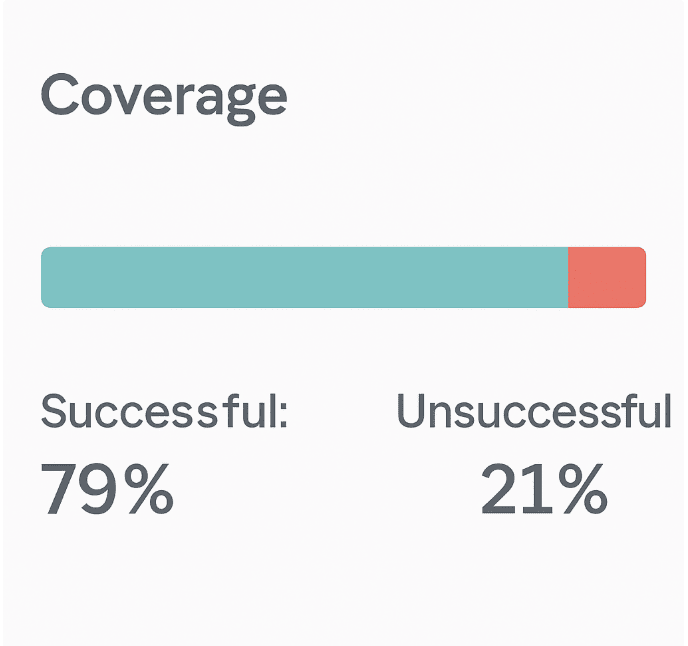
Exhibit

Referring to the exhibit, which percentage of Coverage was unsuccessful?

A. 9%

B. 21%

C. 79%

D. 15%

B.   21%

Explanation:

The exhibit shows a Coverage Service Level Expectation (SLE) dashboard from Juniper Mist. Two metrics are presented:

Successful: 79%
Unsuccessful: 21%

The question asks: "which percentage of Coverage was unsuccessful?" The answer is explicitly displayed as 21%. In Mist SLE dashboards, the successful and unsuccessful percentages always sum to 100%, representing the total client minutes analyzed. No calculation or interpretation is required—the answer is directly visible.

Why other options are incorrect:

A. 9%
❌ This value does not appear anywhere in the exhibit. It may be a distractor based on common misconceptions (e.g., subtracting 79% from 100% incorrectly yields 21%, not 9%; or confusing Coverage with another SLE like Capacity). There is no mathematical or visual basis for 9%.

C. 79%
❌ This is the successful Coverage percentage, not the unsuccessful one. This is a classic trick: the question asks for unsuccessful, but the larger, more prominent number is 79%, which candidates might select without reading carefully. In Mist SLE dashboards, both percentages are displayed side by side, but the label "Successful" or "Unsuccessful" must be followed.

D. 15%
❌ Not present in the exhibit. Fifteen percent might be a plausible value for unsuccessful in other SLE categories (e.g., Time to Connect or Throughput), but for this specific Coverage SLE, the displayed value is 21%. This option has no relation to the data shown.

References:

Juniper Mist documentation– SLE Coverage: "The Coverage SLE measures the percentage of time a client’s RSSI remains above -75 dBm. The dashboard displays both successful and unsuccessful percentages, which sum to 100% of client minutes."

JNCIA-MistAI Exam Blueprint (Section 2.0):"Interpret SLE dashboards including Coverage, Capacity, Connectivity, and Throughput."

Which two features are part of Juniper Mist Wired Assurance? (Choose two.)

A. template-based configuration for switches

B. template-based configuration for routers

C. WxLAN policies

D. port profiles

A.   template-based configuration for switches
D.   port profiles

Explanation:

Juniper Mist Wired Assurance is a cloud-native solution for managing Juniper EX Series switches. Two of its fundamental configuration features are template-based configuration for switches and port profiles .

A. Template-based configuration for switches
– Wired Assurance uses switch templates to apply consistent configurations across multiple switches or sites. Templates define global settings (RADIUS, NTP, VLANs) and can be assigned to sites, allowing switches to automatically inherit configurations upon onboarding . This streamlines deployment, reduces errors, and enables scalability.

D. Port profiles
– Port profiles are reusable configuration bundles applied to switch ports. They allow you to define settings like PoE, VLAN assignments, and speed negotiation once and apply them to multiple ports or devices (e.g., cameras, APs, IoT devices) . Combined with dynamic port configuration, this enables "colorless ports" where devices automatically inherit correct settings .

Why other options are incorrect

B. Template-based configuration for routers
– Wired Assurance is specifically designed for EX Series switches, not routers. Router management falls under different Mist offerings like WAN Assurance, not Wired Assurance.

C. WxLAN policies
– WxLAN is primarily a wireless policy framework for network segmentation, role-based access, and micro-segmentation on Mist APs . While policies can apply across wired/wireless, WxLAN itself is not a core feature of Wired Assurance; it belongs to Wi-Fi Assurance.

References

Juniper Wired Assurance product page: "Configure and scale sites and switches using templates and port profiles"

Juniper configuration guide: "Create port profiles for camera devices...Switch templates allow you to apply the same settings to switches across sites"

Page 1 out of 13 Pages

Why Take This JN0-253 Mist AI - Associate (JNCIA-MistAI) Practice Exam Before the Real Exam?


This free Mist AI - Associate (JNCIA-MistAI) practice test gives you three critical advantages:

  • Real format, real pressure – Identical question structure and difficulty to the official exam
  • Instant gap detection – You'll know exactly which topics need more attention
  • Learn as you go – Every answer includes a clear explanation, so you're studying while testing