- 4.9/5.0
- 106 Questions
- Updated on: 7-Sep-2026
- Enterprise Routing and Switching Specialist (JNCIS-ENT)
- 1106+ Prepared
- Valid Worldwide
Free JN0-351 Practice Test Questions | Know You're Ready for Enterprise Routing and Switching Specialist (JNCIS-ENT)
Which two statements are correct about IS-IS? (Choose two.)
A. IS-IS uses IPv6 as its transport protocol in the Junos OS Implementation.
B. IS-IS has two metric types and Junos sends both by default.
C. IS-IS sends a maximum metric value of 63 by default.
D. IS-IS only allows you to configure two areas.
C. IS-IS sends a maximum metric value of 63 by default.
Explanation:
B. IS-IS has two metric types and Junos sends both by default.
IS-IS uses two Type-Length-Value (TLV) pairs for metrics: the original narrow metrics (TLVs 1, 2, 6, 8, 9, 10) with a maximum value of 63, and the newer wide metrics (TLVs 22, 23, 25, 135, 222, 223) for traffic engineering support . By default, Junos OS sends both pairs of TLVs, supporting interoperability with older and newer IS-IS implementations simultaneously .
C. IS-IS sends a maximum metric value of 63 by default.
The original IS-IS metric specification limits individual link metrics to a maximum value of 63 . Total path cost is limited to 1023 by default. This narrow metric is sent in the original TLV pair. Only when you configure the wide-metrics-only statement does Junos support the extended metric range up to 16,777,215 .
Why other options are wrong:
A. IS-IS uses IPv6 as its transport protocol in the Junos OS implementation.
Incorrect. IS-IS runs directly over Layer 2 (Data Link Layer) using ISO CLNS (Connectionless Network Service), not over IPv4 or IPv6 . Unlike OSPF, IS-IS does not require an IP transport protocol. However, Junos OS supports IS-IS for both IPv4 and IPv6 routing natively—IPv6 routes are carried within the same IS-IS protocol without requiring a separate version . The transport remains ISO CLNS, not IPv6.
D. IS-IS only allows you to configure two areas.
Incorrect. IS-IS supports a hierarchical two-level structure (Level 1 for intra-area routing, Level 2 for inter-area routing), but you can configure many areas within a domain . The "two" refers to the levels, not the quantity of areas. Each Level 1 router belongs to one area, but a domain can contain numerous areas connected via Level 2 routers.
References:
Juniper TechLibrary: "Understanding Wide IS-IS Metrics for Traffic Engineering" – "IS-IS generates two TLV pairs... By default, Junos OS supports the sending and receiving of wide metrics. Junos OS allows a maximum metric value of 63 and generates both pairs of TLVs."
Juniper TechLibrary:"IS-IS Overview" – "IS-IS runs directly over Layer 2... The configuration for IPv6 and IPv4 is identical in the Junos OS implementation of IS-IS."
You are using tunnels in your network. It is important that the routes be specific enough to ensure that the tunnels are established. You need to prevent a route that is new to the network from being used. In this scenario, which type of route should be used?
A. aggregate
B. anycast
C. static
D. multicast
Explanation:
The question describes a scenario where routes must be specific enough to ensure tunnels are established, but a new route introduced to the network must be prevented from being used. This requires a route type that is conditional—it only becomes active when more specific routes (the "new" routes) are absent, and it can be suppressed when those more specific routes appear.
Why Other Options Are Wrong
B. anycast
– Incorrect. Anycast is a forwarding method, not a route type. It involves advertising the same IP prefix from multiple locations. It does not inherently prevent new routes from being used.
C. static
– Incorrect. Static routes are manually configured and always active (provided the next hop is valid). They do not automatically suppress themselves when newer, more specific routes appear. A static route could accidentally override new learned routes unless carefully managed with preferences.
D. multicast
– Incorrect. Multicast refers to one‑to‑many communication and multicast routing protocols (e.g., PIM, IGMP). It is not a route type designed for conditional activation based on more specific routes.
References:
Juniper TechLibrary: "Understanding Aggregate Routes" – "An aggregate route is considered active only when at least one contributing route exists in the routing table."
JNCIS‑ENT Study Guide (Routing Policy & Aggregates) – "Aggregate routes can be suppressed using policies to prevent their advertisement when more‑specific routes are present."
Which two statements are correct about link aggregation? (Choose two.)
A. LAGs provide physical layer redundancy.
B. Member links must use the same MTU. C.
C. IP traffic is hashed using source and destination MAC addresses
D. All RE-generated traffic traverses the lowest member link.
D. All RE-generated traffic traverses the lowest member link.
Explanation:
B. Member links must use the same MTU.
This is correct. All member links in a Link Aggregation Group (LAG) must have consistent settings, including the same Maximum Transmission Unit (MTU), speed, and duplex mode. MTU mismatches can cause traffic drops or prevent the LAG from forming properly.
D. LAGs provide physical layer redundancy.
This is correct. Link Aggregation Groups provide redundancy by bundling multiple physical interfaces into a single logical link. If one member link fails, traffic continues on the remaining links without disruption. This increases overall network availability and reliability.
Why Other Options Are Wrong
A. IP traffic is hashed using source and destination MAC addresses.
Incorrect. By default, Juniper's implementation of 802.3ad (LAG) balances traffic based on Layer 3 information carried in the packet (source/destination IP addresses), not MAC addresses. While you can configure MAC-based hashing using the multiservice family option with source-mac and destination-mac statements, this is not the default behavior and is not standard for IP traffic.
C. All RE-generated traffic traverses the lowest member link.
Incorrect. Routing Engine (RE)-generated traffic does not always traverse the lowest member link. Traffic distribution depends on the hash algorithm used for load balancing. RE-generated control traffic can use any link in the LAG bundle based on the hashing mechanism, not exclusively the lowest-numbered member link.
References
Juniper TechLibrary:"Load Balancing for Aggregated Ethernet Interfaces" – Default LAG load balancing uses Layer 3 information, not MAC addresses
Juniper TechLibrary: "Understanding Virtual Chassis Port Link Aggregation" – "Link aggregation provides network redundancy by load-balancing traffic across all available links"
You are asked to configure a redundant trunk group (RTG). Which two requirements would accomplish this task? (Choose two.)
A. The RTG must be participating in a Spanning Tree topology.
B. Interfaces within an RTG can be configured as access ports.
C. Interfaces within an RTG must be configured as trunk ports.
D. Both interfaces of an RTG must be configured to service the same VLANS
D. Both interfaces of an RTG must be configured to service the same VLANS
✅ Explanation:
C. Interfaces within an RTG must be configured as trunk ports.
This is correct. A redundant trunk group (RTG) is, as the name implies, designed specifically for trunk interfaces. Juniper's official documentation explicitly states that before you configure an RTG, you must have "configured at least two interfaces with their port mode set to trunk". The trunk interfaces carry multiple VLANs between the access switch and distribution switches. While some community discussions suggest access ports might theoretically work, the Juniper certification expects the documented requirement: RTG interfaces must be trunk ports.
D. Both interfaces of an RTG must be configured to service the same VLANs.
This is correct. For an RTG to function properly, both member trunk interfaces must have identical VLAN configurations. Juniper's J-Web configuration guide explicitly lists as a prerequisite: "All the selected trunk interfaces to be added to the RTG have the same VLAN configuration". This ensures seamless failover—when the active link fails and the secondary link takes over, traffic continues flowing on the same VLANs without disruption.
❌ Why Other Options Are Wrong
A. The RTG must be participating in a Spanning Tree topology.
Incorrect. This is the opposite of a requirement. RTG is specifically designed as an alternative to Spanning Tree Protocol (STP) to achieve faster convergence. Juniper's documentation explicitly states: "The selected trunk interfaces are not part of a spanning-tree configuration". In fact, "an interface is not allowed to be in both a redundant trunk group and in a spanning-tree protocol topology at the same time". You must disable STP on all interfaces that are part of an RTG.
B. Interfaces within an RTG can be configured as access ports.
Incorrect. RTG is designed for trunk ports carrying multiple VLANs between distribution and access layers. While some online discussions debate whether access ports could work, Juniper's official documentation is clear: interfaces in an RTG must be configured with "port mode set to trunk". The feature is called "Redundant Trunk Group" for this reason.
📚 Reference
Juniper Networks Documentation:"Redundant Trunk Groups" - "Configured at least two interfaces with their port mode set to trunk"
Juniper J-Web Guide: "Configuring Redundant Trunk Groups" - RTG prerequisites include interfaces not part of spanning-tree and same VLAN configuration
You deployed a new EX Series switch with DHCP snooping enabled and you do not see any entries in the snooping databases for an interface. Which two Juniper configurations for that interface caused this issue? (Choose two.)
A. The interface is configured as a disabled port.
B. MAC limiting is enabled on the interface.
C. The interface is configured as a trunk port.
D. Dynamic ARP inspection is enabled on the interface.
C. The interface is configured as a trunk port.
Explanation:
A. The interface is configured as a trunk port.
This is correct because, by default, all trunk ports on an EX Series switch are trusted for DHCP snooping. DHCP snooping does not create binding entries for DHCP messages received on trusted ports. The switch only snoops and records IP-MAC bindings from DHCP messages received on untrusted access ports to secure the network against spoofing attacks.
C. The interface is configured as a disabled port.
This is correct. If an interface is administratively disabled (shut down), it cannot send or receive any traffic, including DHCP messages. Without DHCP traffic passing through the interface, the switch has no DHCP messages to snoop, and thus no entries are added to the DHCP snooping database for that interface.
❌ Why the Other Options Are Incorrect
B. MAC limiting is enabled on the interface.
MAC limiting is a feature that restricts the number of MAC addresses that can be learned on an interface. While it can be configured alongside DHCP snooping for port security, MAC limiting does not prevent DHCP snooping from creating binding entries. A device can successfully obtain a DHCP lease and have its IP-MAC binding recorded in the database until the MAC limit is exceeded.
D. Dynamic ARP inspection is enabled on the interface.
DAI relies on the DHCP snooping binding database to validate ARP packets. Enabling DAI does not stop DHCP snooping; in fact, in Juniper OS, configuring DAI automatically enables DHCP snooping on that VLAN. DAI actively uses the database entries created by DHCP snooping, so this configuration would not prevent the creation of those entries.
📚 Reference
Juniper Networks Documentation: "Understanding DHCP Snooping for Port Security on EX Series Switches" — "By default, all trunk ports on the switch are trusted and all access ports are untrusted for DHCP snooping."
Juniper Networks Documentation: "Enabling DHCP Snooping (CLI Procedure)" — "You configure DHCP snooping for each VLAN, not for each interface (port). By default, DHCP snooping is disabled for all VLANs."
You have deployed a Juniper EX Series switch in the network. The switch receives a unicast frame destined to a MAC address that is not registered in the bridging table. Which statement describes the behavior of the switch?
A. The frame is flooded out all ports in all VLANs configured on the switch.
B. The frame is flooded out all ports that are part of the same VLAN, except the receiving port.
C. The switch performs an ARP request to discover the MAC address of the destination host.
D. The switch sends an error message to the sender declaring that the host is unreachable.
Explanation:
When a Juniper EX Series switch (or any Ethernet bridge/switch) receives a unicast frame whose destination MAC address is not present in its MAC address table (bridging table), the switch does not know which specific port the destination device resides on. This situation is called an unknown unicast.
Why other options are wrong:
A. The frame is flooded out all ports in all VLANs configured on the switch.
Incorrect. Flooding is limited to the specific VLAN associated with the frame. Flooding across all VLANs would violate Layer 2 domain separation and create major security and performance issues.
C. The switch performs an ARP request to discover the MAC address of the destination host.
Incorrect. ARP is used by IP hosts to resolve IP addresses to MAC addresses, not by a switch to find a MAC address for an incoming unicast frame. Switches do not generate ARP requests for unknown destination MACs.
D. The switch sends an error message to the sender declaring that the host is unreachable.
Incorrect. Ethernet switching does not provide error feedback for unknown unicast destinations. The switch simply floods the frame; if the destination does not exist, the frame is silently dropped.
Reference
JNCIS‑ENT Study Guide (Layer 2 Switching / Bridging) – "A switch floods unknown unicast frames out all ports in the same VLAN except the ingress port."
Juniper TechLibrary: “Ethernet Switching and VLANs” – “When a frame with an unknown destination MAC address arrives, the switch floods it to all ports within the VLAN to locate the destination.”
You have DHCP snooping enabled but no entries are automatically created in the snooping database for an interface on your EX Series switch. What are two reasons for the problem? (Choose two.)
A. The device that is connected to the interface has performed a DHCPRELEASE.
B. MAC limiting is enabled on the interface.
C. The device that is connected to the interface has a static IP address.
D. Dynamic ARP inspection is enabled on the interface.
C. The device that is connected to the interface has a static IP address.
✅ Explanation:
B. MAC limiting is enabled on the interface.
This is correct. MAC limiting is a port security feature that restricts the number of MAC addresses that can be learned on an interface. When this limit is reached or if the feature is configured in certain ways, the switch can be configured to drop all further traffic, including DHCP messages. Without successful DHCP message processing (Discover, Offer, Request, Ack), the switch cannot snoop the DHCP exchange and therefore cannot create a binding entry for that client in the DHCP snooping database. Additionally, if the MAC limit is exceeded for a client, the switch may block that client's traffic entirely, preventing DHCP communication.
C. The device that is connected to the interface has a static IP address.
This is also correct. DHCP snooping creates binding entries by observing the DHCP message exchange between a client and a DHCP server. The process requires the client to send a DHCPDISCOVER and receive a DHCPOFFER, then send a DHCPREQUEST and receive a DHCPACK. The switch snoops these messages to learn the client's MAC address, leased IP address, VLAN, lease time, and interface. If a device uses a static IP address, it never sends any DHCP messages. Consequently, the switch never sees any DHCP traffic from that device and cannot create a binding entry for it.
❌ Why Other Options Are Wrong<
A. The device that is connected to the interface has performed a DHCPRELEASE.
Performing a DHCPRELEASE removes an existing binding from the snooping database, but such an entry would have existed previously. The question states the administrator does not see "any entries" for an interface, implying that no entries have been created from the start. A DHCPRELEASE explains removal of existing entries, not the complete absence of them. However, if the question intends that the database has no entries at all for this interface (not that entries were present and then removed), DHCPRELEASE is not the most direct and correct explanation—the two primary reasons a binding never appears are either no DHCP traffic occurs (static IP) or traffic is blocked (MAC limiting). Some implementations may treat DHCPRELEASE as clearing the binding, but the core issue for never having entries is the absence of the complete DHCP handshake.
D. Dynamic ARP inspection is enabled on the interface.
Dynamic ARP Inspection (DAI) relies on the DHCP snooping database to validate ARP packets; it does not prevent DHCP snooping from creating database entries. In fact, on Juniper EX Series switches, configuring DAI automatically enables DHCP snooping on the VLAN. DAI actively uses the entries that DHCP snooping creates. Therefore, enabling DAI would not cause the snooping database to be empty; rather, it depends on a populated database to function correctly.
📚 Reference
Juniper Networks Documentation: "Understanding DHCP Snooping for Port Security on EX Series Switches" – "When DHCP snooping is enabled, the system snoops the DHCP messages to view DHCP lease information and build and maintain a database of valid IP address to MAC address (IP-MAC) bindings called the DHCP snooping database"
Juniper Networks Documentation: "Verifying Port Security" – "DHCP snooping allows the switch to monitor and control DHCP messages received from untrusted devices"
Exhibit.
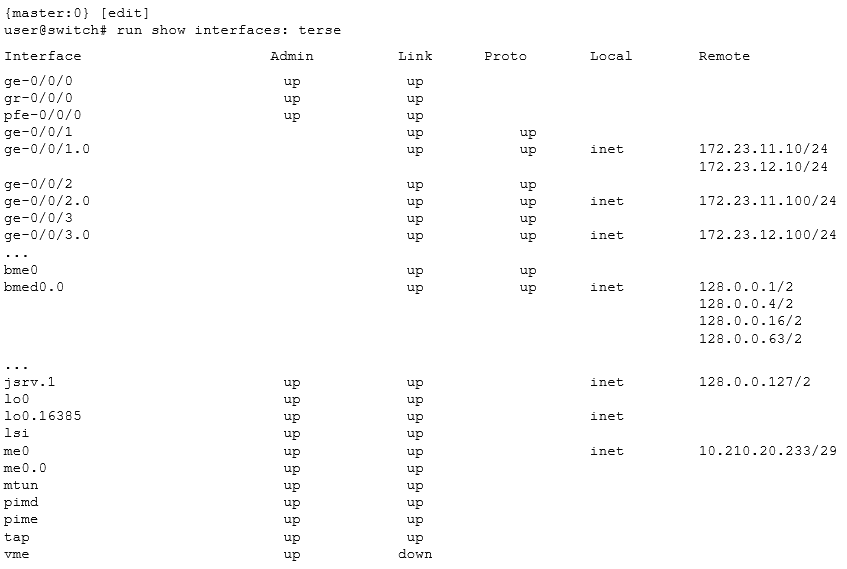
What is the management IP address of the device shown in the exhibit?
A. 10.210.20.233
B. 172.23.12.100
C. 128.0.0.1
D. 172.23.11.10
Explanation:
In the exhibit, the me0 interface is shown with an IP address:
text
me0 up up inet 10.210.20.233/29
me0.0 up up up
me0 is the Management Ethernet interface on Juniper EX Series switches, used exclusively for out‑of‑band management. This interface operates independently of the forwarding plane and is not used for normal network traffic. Therefore, 10.210.20.233 is the management IP address.
Why other options are wrong
B. 172.23.12.100
– This IP is assigned to ge-0/0/3.0, a standard data interface used for forwarding network traffic. It is a data plane IP, not a dedicated management IP.
C. 128.0.0.1
– This address appears under bme0.0 (Broadcast and Management Engine) and jsrv.1 (internal services). These are internal Junos interfaces used for system processes, not for external management access.
D. 172.23.11.10
– This IP is assigned to ge-0/0/1.0, another data plane interface. Like option B, this is for network traffic, not management.
Reference
Juniper TechLibrary: “Management Ethernet Interface (me0)” – “The management Ethernet interface (me0) is an out‑of‑band management interface on EX Series switches. It has its own dedicated management routing table (inet.0 for management) and is used to access the switch for administrative purposes.”
JNCIS‑ENT Study Guide (System Management) – “Management IP addresses are typically configured on me0 or fxp0 for out‑of‑band access, distinguishing them from data plane IPs on ge‑, xe‑, or et‑ interfaces.”
| Page 4 out of 14 Pages |