- 4.9/5.0
- 66 Questions
- Updated on: 12-Oct-2026
- Security, Specialist (JNCIS-SEC)
- 166+ Prepared
- Valid Worldwide
Free JN0-336 Practice Test Questions | Know You're Ready for Security, Specialist (JNCIS-SEC)
Which three actions does Junos Space Security Director perform during the device discovery process? (Choose three.)
A. It imports the device’s active device configuration.
B. it reboots the device.
C. It imports device status information
D. It adds a local superuser account to the device configuration.
E. It connects to the device using SSH.
C. It imports device status information
E. It connects to the device using SSH.
Explanation:
During the device discovery process in Junos Space Security Director, the system establishes a secure connection to the target device, retrieves its current operational status, and imports its active configuration into the Junos Space database . The process uses SSH for secure communication and does not reboot the device or modify its local user accounts.
Correct Option:
A. It imports the device's active device configuration.
Security Director imports the firewall policy and other configuration elements from the discovered device into its database . After discovery, the imported policies are available for management.
C. It imports device status information.
The discovery process gathers device status and other operational information as part of the import . This includes connection status and management information.
E. It connects to the device using SSH.
The discovery profile requires credentials for authentication, and the system connects to the device using SSH for management . This is a prerequisite for importing configuration.
Incorrect Option:
B. It reboots the device.
The discovery process does not involve rebooting the device. Rebooting would disrupt network operations and is not a step in importing configuration or adding a device to management.
D. It adds a local superuser account to the device configuration.
The discovery process uses credentials provided in the discovery profile; it does not create new user accounts on the target device .
Reference:
Juniper Networks Documentation: Device discovery uses profiles with credentials and connects via SSH .
Using Junos Space Security Director, you want to configure a unique firewall policy for a specific SRX Series device.
Which firewall policy rule would satisfy the requirement?
A. all devices policy prerules
B. group policy prerules
C. device policy rules
D. all devices policy postrules
Explanation:
In Junos Space Security Director, firewall policies are classified into types based on their scope of application. A device policy is specifically designed to apply to a single, unique SRX Series device. This satisfies the requirement of configuring a unique firewall policy for a specific device. Other policy types like 'all devices' or 'group policies' apply globally or to multiple devices.
Correct Option:
C. device policy rules.
A device policy is a firewall policy created per device. It is used when you want to push a unique firewall policy configuration to a particular device, which directly meets the requirement.
Incorrect Option:
A. all devices policy prerules.
These are global policies applied to all devices. They cannot provide a unique configuration for a single specific SRX device.
B. group policy prerules.
Group policies are shared policies that can be applied to multiple devices. They are not unique to a single device.
D. all devices policy postrules.
Similar to other 'all devices' policies, these apply globally and cannot isolate a configuration to one specific device.
Reference:
Juniper Networks Documentation: "Device Policy—Type of firewall policy that is created per device. This type of policy is used when you want to push a unique firewall policy configuration per device".
How does the SSL proxy service identify SSL traffic?
A. by examining the URL
B. by using AppID results
C. by examining the destination port
D. by reading the server certificate
Explanation:
The SSL proxy service relies on the Application Identification (AppID) engine to dynamically detect if a particular session is SSL-encrypted . The proxy only initiates its functionality after AppID identifies the traffic as SSL/TLS, as indicated by a session being marked as "Encrypted=Yes" in the application system cache . Relying on destination port alone is unreliable, as SSL traffic can run on non-standard ports .
Correct Option:
B. by using AppID results.
SSL proxy uses application identification services to determine if a session is SSL encrypted . This process is dynamic and part of AppSecure, allowing the proxy to be enabled as an application service within a security policy after the traffic is identified . This method ensures the proxy correctly handles traffic even when it uses non-standard ports .
Incorrect Option:
A. by examining the URL.
While SSL proxy can log URL categories from the Server Name Indication (SNI) or certificate fields for whitelisting purposes, URL examination is not the primary mechanism used to identify SSL traffic for proxy initiation . AppID is the core technology for this identification.
C. by examining the destination port.
This is a traditional method that is not used by Juniper's SSL proxy. The proxy is designed to work dynamically using AppID, which means it can correctly identify SSL traffic regardless of the port number . Relying only on destination port would fail for non-standard SSL configurations.
D. by reading the server certificate.
While the server certificate is used for establishing secure connections and can be inspected for whitelisting and logging, it is not the mechanism used to identify the traffic as SSL in the first place . AppID is the tool used to make this initial determination before the proxy engages.
Reference:
Juniper Networks Documentation: SSL Proxy Overview - How SSL Proxy Works with Dynamic Application Identification .
Juniper Networks Documentation: Application Identification (AppID) support for SSL Proxy .
Juniper Networks Documentation: SSL Proxy in an Application Firewall .
Which protocol does the SRX Series Firewall use to communicate with a Windows domain controller?
A. SSH
B. LDAP
C. DNS
D. NETCONF
Explanation:
The SRX Series firewall communicates with a Windows domain controller using the Lightweight Directory Access Protocol (LDAP) to retrieve user and group mapping information for integrated user firewall features. In a typical scenario, the Windows domain controller acts as the LDAP server. The SRX downloads user and group lists, and queries the LDAP server for updates .
Correct Option:
B. LDAP.
The SRX Series device uses LDAP to access the Active Directory domain controller as an LDAP server . This is configured under the user-group-mapping hierarchy using the ldap keyword, which is the required protocol for this function . For security, LDAP can be encrypted using SSL (LDAPS) on port 636 .
Incorrect Option:
A. SSH.
SSH is used for secure command-line management of the SRX device, not for querying user and group information from a Windows domain controller.
C. DNS.
DNS is used for name resolution on the network and is not the protocol used by the SRX to directly query user-group mappings from the domain controller.
D. NETCONF.
NETCONF is a network management protocol used to install, manipulate, and delete the configuration of network devices. It is not used to communicate with a domain controller for user identity services.
Reference:
Juniper Networks Documentation: The SRX Series Firewall acts as an LDAP client communicating with an LDAP server. In a common implementation scenario, the domain controller acts as the LDAP server .
Juniper Networks Documentation: The LDAP server provides user-to-group mappings to the SRX Series, with the domain controller acting as the LDAP server in typical customer scenarios
You are asked to configure a cluster between SRX1 and SRX2.
Which two commands must be used to accomplish this task? (Choose two.)
A. user@SRX2# set chassis cluster cluster-id 0 node 1
B. user@SRX1> set chassis cluster cluster-id 1 node 0
C. user@SRX2> set chassis cluster cluster-id 1 node 1
D. user@SRX1# set chassis cluster cluster-id 0 node 2
C. user@SRX2> set chassis cluster cluster-id 1 node 1
Explanation:
To form a chassis cluster, you must enable cluster mode on each device. This is done using the operational mode command set chassis cluster cluster-id
Correct Option:
B. user@SRX1> set chassis cluster cluster-id 1 node 0.
This command correctly assigns cluster-id 1 to SRX1 and designates it as node 0 . A valid cluster ID is between 1 and 255 , and node IDs are binary choices (0 or 1). The > prompt indicates the command must be entered in operational mode .
C. user@SRX2> set chassis cluster cluster-id 1 node 1.
This command correctly assigns the same cluster-id 1 to SRX2 and designates it as node 1 . Both nodes in a cluster must use the same cluster ID , and each node must have a distinct, valid node ID .
Incorrect Option:
A. user@SRX2# set chassis cluster cluster-id 0 node 1.
This is incorrect for two reasons. First, a cluster-id of 0 is not valid for forming a cluster; it is effectively used to disable clustering . Second, the # prompt suggests configuration mode, but the command to set the cluster ID and node ID is an operational mode command .
D. user@SRX1# set chassis cluster cluster-id 0 node 2.
This is incorrect for several reasons: the cluster-id is set to an invalid value of 0 ; the node-id is set to 2, which is outside the allowed range of 0 to 1 ; and it incorrectly uses the configuration mode prompt (#) .
Reference:
Juniper Networks CLI Reference: set chassis cluster cluster-id node node-number reboot
Juniper Networks Documentation: "A cluster is identified by a cluster ID (cluster-id) specified as a number from 1 through 255. Setting a cluster ID to 0 is equivalent to disabling a cluster. A cluster node is identified by a node ID (node) specified as a number from 0 to 1"
What are two ways to help reduce false positives for an IDP rule? (Choose two.)
A. Change the rule to a lower severity action.
B. Remove the attack object from the rule.
C. Create an exempt rule.
D. Configure a terminal rule at the end of the rule base.
C. Create an exempt rule.
Explanation:
False positives occur when benign traffic is incorrectly identified as malicious. To reduce them, you can either remove the specific attack object triggering the false alert from the rule, or create an exempt rule to explicitly "whitelist" trusted sources or traffic that you know is safe. Both methods help eliminate unnecessary logs and improve detection accuracy .
Correct Option:
B. Remove the attack object from the rule.
If a specific attack object generates false positives for a particular destination server or application, you can remove it from the rule. For instance, if the attack applies to a software version not present in your network, deleting it ensures the rule no longer looks for that irrelevant threat .
C. Create an exempt rule.
The Exempt rulebase is specifically designed to handle false positives by categorically excluding traffic segments you know are safe from being processed by the IDP rulebase. This allows you to "whitelist" trusted sources or benign traffic that incorrectly triggers alerts .
Incorrect Option:
A. Change the rule to a lower severity action.
Changing the severity affects logging and alerting priorities but does not stop the false positive detection itself. It merely reduces the alert's importance in logs, which does not solve the underlying false detection problem .
D. Configure a terminal rule at the end of the rule base.
A terminal rule stops further rule processing after a match, but it doesn't directly reduce false positives within an existing rule. The more common and effective methods are removing the offending attack object or using the Exempt rulebase .
Reference:
Juniper Networks Documentation: "Reducing False Positives" workflow - Remove attack objects or use Exempt rules .
Juniper Networks Documentation: Understanding the Exempt Rulebase - for "whitelisting" traffic and reducing false positives .
Referring to the exhibit, what should you do to ensure that Juniper ATP Cloud detects
malware in HTTPS traffic?
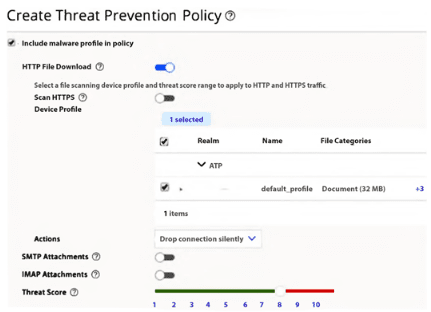
A. Manually configure and apply an SSL proxy profile.
B. Lower the threat score.
C. Configure a new device profile that includes encrypted traffic.
D. Change the action to redirect the encrypted traffic to a decryption device.
Explanation:
By default, Juniper ATP Cloud only scans HTTP traffic. To also scan HTTPS traffic, you must configure and apply an SSL forward proxy profile. This enables the SRX Series device to decrypt the encrypted traffic, inspect its contents, and send any suspicious files to Juniper ATP Cloud for malware analysis. Applying the SSL proxy is a prerequisite for scanning HTTPS.
Correct Option:
A. Manually configure and apply an SSL proxy profile.
To inspect HTTPS traffic, you must explicitly configure an SSL forward proxy profile. This is done by generating a CA certificate, defining a profile that references it, and then applying that profile to the security policy. The policy must include both the ssl-proxy and advanced-anti-malware application services.
Incorrect Option:
B. Lower the threat score.
The threat score is a threshold value that determines what action to take on a file. It does not determine whether the traffic is inspected in the first place. Lowering the threshold would make the system more sensitive to files that are scanned, but it does not cause HTTPS traffic to be scanned.
C. Configure a new device profile that includes encrypted traffic.
A device profile is used to specify file types and size limits, but it does not have a setting to enable scanning of HTTPS traffic. The ability to inspect HTTPS traffic is governed by the SSL proxy configuration, not the device profile.
D. Change the action to redirect the encrypted traffic to a decryption device.
Juniper ATP Cloud is designed to work with the SRX Series' built-in SSL proxy for decryption. There is no separate "decryption device" to redirect traffic to; the SRX itself performs the decryption function.
Reference:
Juniper Networks Documentation: Enable Juniper ATP Cloud for Encrypted HTTPS Connections
Juniper Networks Documentation: Configure Juniper ATP Cloud Policy
What are two causes that end the processing of rules in IDP? (Choose two.)
A. when a rule is matched in the rule base with an action of close
B. when a terminal rule is matched in the rule base
C. when any rule is matched in the exempt rule base
D. when a rule is matched in the rule base with an action of ignore
Explanation:
In Juniper IDP, rule processing terminates under two specific conditions: when a terminal rule is matched, or when a rule with the action ignore is matched. The ignore action is designed to stop further evaluation after identifying traffic as benign. The terminal attribute explicitly halts processing after a match, ensuring no subsequent rules are evaluated.
Correct Option:
B. when a terminal rule is matched in the rule base.
A terminal rule, by design, stops further rule processing once a match occurs . This is a configurable attribute that, when set, ensures no subsequent rules in the rulebase are evaluated after a match .
D. when a rule is matched in the rule base with an action of ignore.
The ignore action in an IDP rule explicitly tells the system to stop rule processing for that session . This is used to whitelist traffic and prevent further inspection, effectively ending the rule evaluation .
Incorrect Option:
A. when a rule is matched in the rule base with an action of close.
The close action terminates the session but does not stop rule processing . The system still evaluates other rules to find additional matches for that session before the session is closed .
C. when any rule is matched in the exempt rule base.
The exempt rulebase is processed separately from the main IDP rulebase. Matching an exempt rule bypasses the IDP rulebase entirely, but it does not "end the processing of rules in IDP" as a generic rule . It simply prevents the traffic from being evaluated by the IDP rulebase.
Reference:
Juniper Networks Documentation: IDP Rulebase Processing - Terminal rules and the ignore action stop further evaluation .
| Page 2 out of 9 Pages |