- 4.9/5.0
- 94 Questions
- Updated on: 12-Oct-2026
- Junos - Associate (JNCIA-Junos) Junos OS 21.2
- 194+ Prepared
- Valid Worldwide
Free JN0-106 Practice Test Questions | Know You're Ready for Junos - Associate (JNCIA-Junos) Junos OS 21.2
Junos OS Fundamentals
Click the Exhibit button.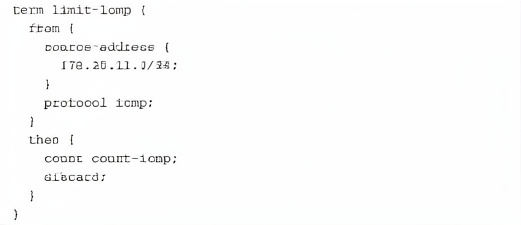
Referring to the exhibit, which two actions will occur when a packet matches the firewall filter? (Choose two.)
A. A counter will be incremented.
B. The packet will be discarded.
C. The packet will be forwarded.
D. An ICMP destination unreachable message will be returned.
B. The packet will be discarded.
Explanation:
The firewall filter term limit-icmp matches ICMP packets from source network 172.25.11.0/24. The then clause executes two actions: count count-icmp increments a counter, and discard silently drops the packet without sending any error notification.
Correct Option:
A: A counter will be incremented.
The count count-icmp action explicitly instructs the device to increment the counter named count-icmp each time a packet matches all conditions in the from statement. This is used for monitoring and statistics.
B: The packet will be discarded.
The discard action silently drops the matching packet. The packet is not forwarded to its destination, and no further processing occurs. No ICMP error message is generated unless explicitly configured.
Incorrect Option:
C: The packet will be forwarded.
This is incorrect because the discard action overrides any implicit accept behavior. The packet is dropped immediately after counting, so it never reaches the forwarding stage.
D: An ICMP destination unreachable message will be returned.
The discard action performs a silent drop. To send an ICMP unreachable message, you would need to use reject instead of discard. The discard action does not generate any notification to the source.
Reference:
Juniper TechLibrary – "Firewall Filter Term Actions": The count action increments a named counter; discard silently drops the packet without sending any ICMP error message. For ICMP notifications, use the reject action.
Exhibit: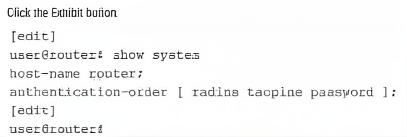
You have configured multiple authentication methods on your Junos device, including RADIUS, TACACS+, and local user accounts. A user attempts to log in, but the RADIUS server is unavailable. Referring to the
exhibit, which statement is correct?
A. The user is prompted to select a different authentication method.
B. The login attempt fails immediately
C. Junos will continue to attempt to authenticate with the RADIUS server until it responds.
D. Junos attempts the next configured authentication method.
Explanation:
The authentication-order statement defines the sequence in which Junos checks authentication methods. In the exhibit, the order is RADIUS first, then TACACS+, then local password. When RADIUS is unavailable (timeout or no response), Junos automatically proceeds to the next configured method.
Correct Option:
D: Junos attempts the next configured authentication method.
With authentication-order [ radius tacplus password ], if RADIUS servers are unreachable or do not respond, Junos moves to TACACS+. If TACACS+ also fails, it falls back to the local password database. This ensures continued access even if an external server is down.
Incorrect Option:
A: The user is prompted to select a different authentication method.
Junos does not prompt the user to choose a method. The authentication order is system‑defined and automatic. The user simply provides credentials; the system tries each method sequentially.
B: The login attempt fails immediately.
The login attempt does not fail immediately when RADIUS is unavailable. Junos only fails after exhausting all configured authentication methods in the specified order.
C: Junos will continue to attempt to authenticate with the RADIUS server until it responds.
Junos does not retry the same unreachable server indefinitely for a single login attempt. It respects the timeout and then moves to the next method in the list.
Reference:
Juniper TechLibrary – "Authentication Order": Junos attempts authentication methods in the order specified. If a method is unavailable, the system proceeds to the next method in the list.
Which statement is correct about traffic flow in the network shown in the exhibit?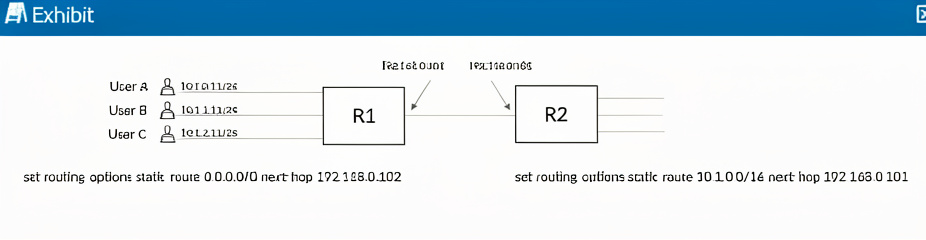
A. A routing loop can occur if one of the users sends packets to 10.1.99.1.
B. Only User A can reach destinations beyond Router R1.
C. Router R2 will drop packets destined for user B and user C.
D. Router R1 will discard all packets from all three users.
Explanation:
The exhibit shows R1 with two static routes: a default route (0.0.0.0/0) pointing to R2 (192.168.0.102), and a route for 10.1.0.0/16 pointing back to R1's own interface (192.168.0.101). No route exists on R2 back to the 10.1.0.0/16 network, creating potential asymmetry and loops.
Correct Option:
A: A routing loop can occur if one of the users sends packets to 10.1.99.1.
10.1.99.1 falls within the 10.1.0.0/16 summary route on R1. R1 forwards such packets toward 192.168.0.101 (itself?), which is problematic. More importantly, if R2 receives a packet for 10.1.0.0/16 and has only a default route back to R1, a loop forms between R1 and R2.
Incorrect Option:
B: Only User A can reach destinations beyond Router R1.
All users (10.1.0.0/24, 10.1.1.0/24, 10.1.2.0/24) are within the 10.1.0.0/16 network, so R1's summary route applies to all. However, the next-hop 192.168.0.101 is likely R1's own interface, which is invalid. No user will properly reach beyond R1 without correct next-hop.
C: Router R2 will drop packets destined for user B and user C.
R2 may have a default route pointing to R1, so it would forward packets toward R1 rather than dropping them. Dropping would occur only if no route exists, but default routes often exist in such topologies.
D: Router R1 will discard all packets from all three users.
R1 will not discard packets; it will attempt to route them according to its static routes. The issue is forwarding misconfiguration (next-hop pointing to itself), not discarding.
Reference:
Juniper TechLibrary – "Static Routing and Routing Loops": A routing loop occurs when two or more routers have inconsistent routing information, causing packets to bounce between them. Invalid next-hop addresses (pointing to self) also cause forwarding failures.
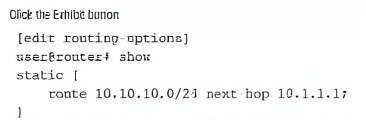
Referring to the exhibit, you are configuring a Junos router to provide connectivity to a building across town on the network 10.10.10.0/24. The next-hop router is at 10.10.1.1, which is reachable using interface ge-0/0/1. After committing the configuration in the exhibit, users report they still cannot reach the 10.10.10.0/24 network, and the route does not appear as active in the routing table. In this scenario, which statement is correct?
A. The next-hop address 10.1.1.1 is not directly connected or reachable through another route.
B. Static routes must include the outgoing interface as the next hop.
C. The static route requires a preference value to be specified or it will not install.
D. The static route requires the retain keyword to remain active in the routing table.
Explanation:
A static route in Junos becomes active (appears in the routing table) only if its next-hop address is resolvable. The next-hop must be directly connected via an interface with an active IP address, or recursively reachable through an existing route. In this case, 10.1.1.1 is not in the same subnet as ge-0/0/1 (which reaches 10.10.1.1), causing resolution failure.
Correct Option:
A: The next-hop address 10.1.1.1 is not directly connected or reachable through another route.
The exhibit shows next-hop 10.1.1.1, but the description states the actual gateway is 10.10.1.1. The mismatch means the router cannot resolve 10.1.1.1 to an active interface. For the route to install, the next-hop must be directly connected or recursively resolved via another active route.
Incorrect Option:
B: Static routes must include the outgoing interface as the next hop.
Junos static routes can use either a next-hop IP address or an outgoing interface (e.g., next-hop ge-0/0/1). Using an IP address is valid and commonly used; the issue here is an incorrect or unreachable IP address.
C: The static route requires a preference value to be specified or it will not install.
Static routes have a default preference value of 5. Specifying a preference is optional and only needed to override the default for route selection purposes. Lack of a preference value does not prevent installation.
D: The static route requires the retain keyword to remain active in the routing table.
The retain keyword keeps a static route in the forwarding table even if the next-hop becomes unreachable. It is not required for normal route activation. The route fails to install due to resolution failure, not because retain is missing.
Reference:
Juniper TechLibrary – "Static Routes: Next-hop Resolution": For a static route to be installed, the next-hop address must be reachable via an active directly connected interface or resolved through an existing route in the routing table.
| Page 2 out of 12 Pages |